Enforce Governance and meet Compliance for a zero-trust, least-privilege security posture
Ask AI Panel with Iframe

How to tackle the challenge of access requests in your workforce management? 

As part of the phase 9.6 release, Hire2Retire has added a new access request feature. It enables users to request additional entitlements while granting organizations full control over approval of workflows; entitlements request catalog, and entitlement validity periods. 

Access management has been a challenge for organizations for years. With the dynamics of businesses changing at a rapid pace, it has become more complex and taxing. Many reports suggest that employees do not get the required access to start their work till 10-15 days when there is even a minor change in the business needs, and their access requests are stuck in informal and unorganized approvals. Furthermore, according to a Verizon report, more than 74% of data security breaches involve excessive or mismanaged access given to employees. Gartner predicts that more than 70% of enterprises will experience disruptions in their operations due to identity-related security failures born from poor access governance.

From granting access to removing it at the right time, the complexity of managing access requests cannot be done manually. As organizations adopt hybrid work models, cross-functional teams, and project-based operations, simple role-based access control models cannot keep up. In this blog, we will discuss how access request dynamics are changing and how they can be solved.

Scenarios where access request management matters the most for organizations

Scenario 1 – Location-specific entitlement

Global organizations often require their employees to temporarily work from another office location. This becomes a challenge when the enterprise has location-based access groups. It can be as simple as office access to network shares and regional apps or distributions lists. Most of the time, these entitlements are granted manually, and the employee must wait a day or 2 to get that access, and they are rarely removed on time.

Scenario 2 – Temporary responsibilities-specific entitlements

When an employee takes long-term leave, their tasks are generally assigned to someone else. It can be due to maternity leave, medical absence or sabbatical, business continuity depends on how fast their work can be continued without any delay. However, that other employee has to run from pole to post to get entitlements required to finish the job of their college. These entitlements are time-sensitive, yet they are handled manually and informally. Once the employee on leave returns, enterprises also fail to identify and remove these entitlements resulting in excessive access.

Scenario 3 – Project-specific entitlements

Project-based work is another scenario where a controlled access request mechanism is needed. Employees regularly join cross-functional or short-term projects within other teams that require access to other tools, resources and applications that do not come under their birthright entitlements. Furthermore, once the project is over, they still walk away with entitlements they shouldn’t have. In the absence of this time-bound entitlement request mechanism, exposure to sensitive data increases and can lead to compliance challenges for organizations.

To tackle such situations and more, we have launched a new access request feature in our 9.6 release.

Introducing Access Requests in Hire2Retire

To address these access management challenges, Hire2Retire has added a new powerful Access Request capability. This feature is designed to complement our end-to-end workforce identity lifecycle automation capabilities. While Hire2Retire automates JML access based on HR data, Access/Entitlement Requests feature extends this automation to cover on-demand accesses that do not come as birthrights.

This feature enables employees to request additional entitlements when business needs arise. These requests follow a structured, auditable workflow where organizations can define who can approve access, which entitlements can be requested, and how revocation of the access is handled.

How it works?

Set up configuration

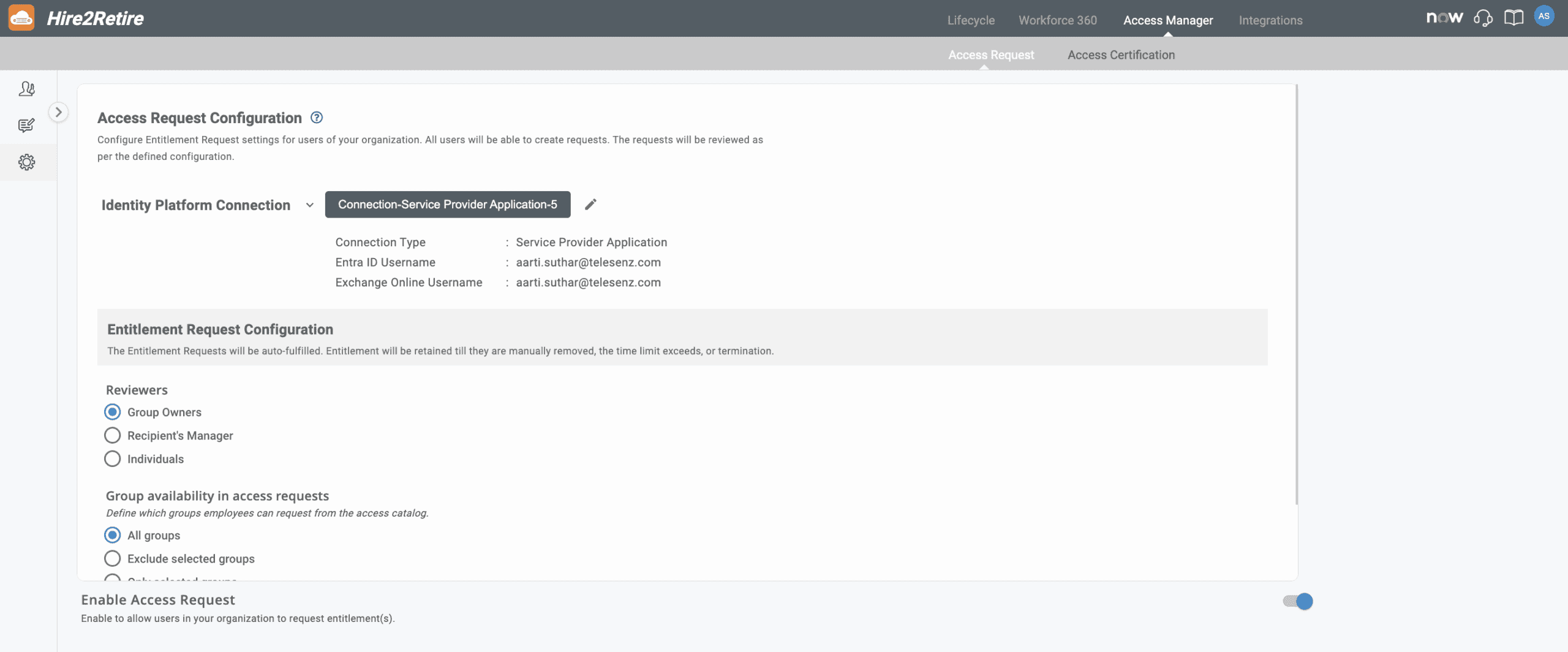
To set up the configuration, the admin first needs to set up a connection with their identity platform. Once the connection is set up, all users will be able to create entitlement requests. The next step is to set up the entitlement request configuration, where the admin can choose who can review the requests (Group Owner, Recipient’s Manager or Individuals). The admin can further define which groups employees can request from the access catalog.

Access Request Configuration

Access/Entitlement Request

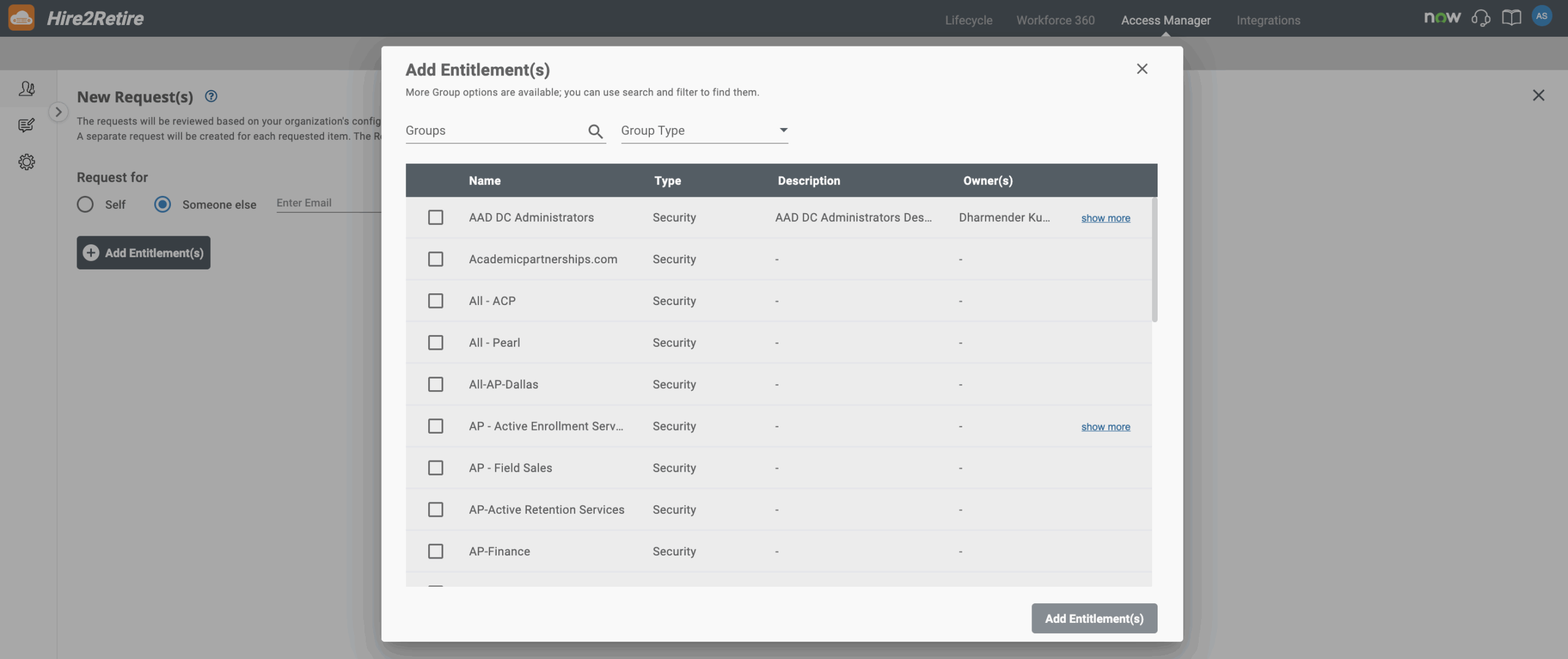
In this, you can choose if you want the entitlements for yourself or someone else in your company. All you need to do is add their company email and choose the group entitlements you want to share. Furthermore, the requested entitlements will be shown on the screen every time you open it so that you can check the ones that were approved or rejected. Each event captured in Observe includes clear operational context, such as:

Request Entitlements

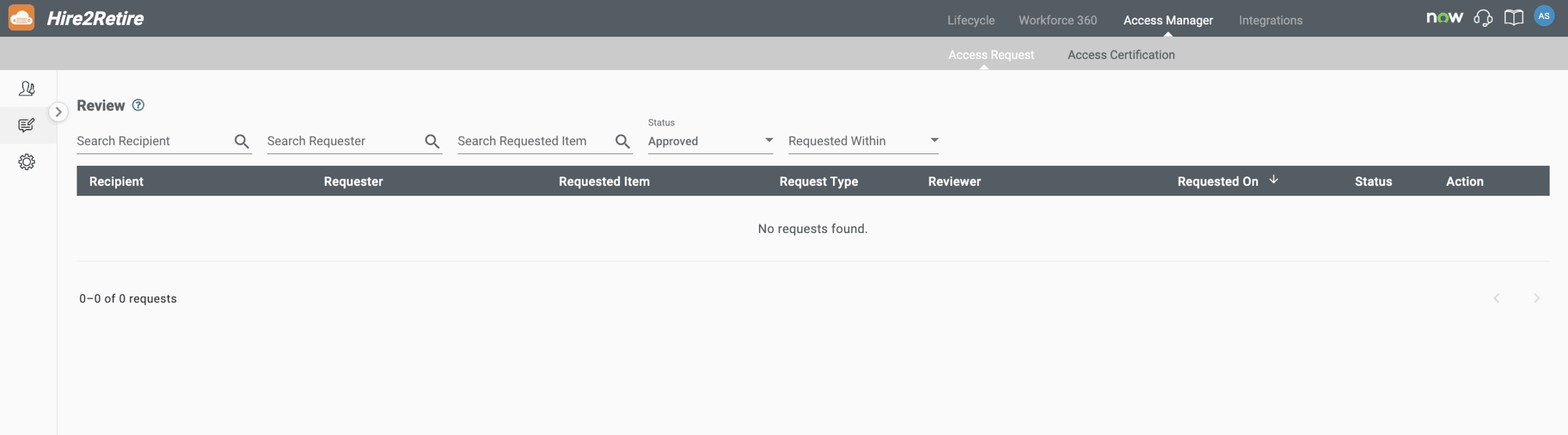
Review Entitlement Request

Here, you can review the requested entitlements with multiple advanced filters. You can search using the name of the recipient, their email address, request status (Approved, pending rejected, fulfilled, revoked) or time period. The requested entitlements will only be visible to the admin, the reviewer, and the group owner. For the rest, it will just show a blank page.

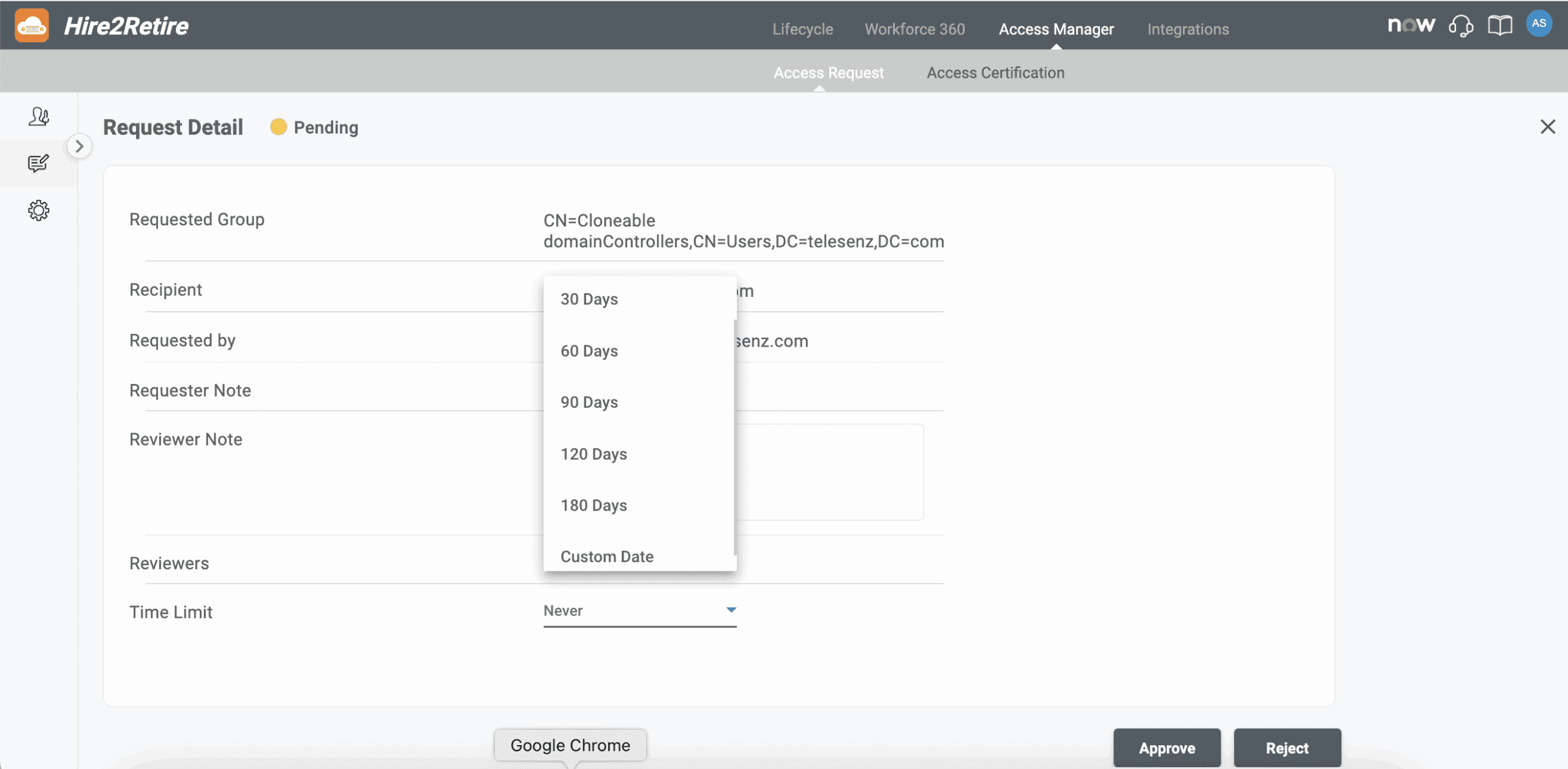
Here you can review the entitlement request for approval or rejection.

Time-Bound Access Permissions

One of the most prominent features of our Access Request Capability is the time-bound entitlements. Every entitlement request has the option of selecting a pre-defined time limits such as 7 days, 30 days, 90 days, or even a year. The reviewers can also customize the duration according to requirements.

Once the approved duration ends, Hire2Retire automatically removes the entitlement without any manual intervention. It helps ensure that access is not retained after it has served its purpose and keeps your data safe. The notification option keeps both requester and reviewer informed of each step in the lifecycle offering transparency and accountability.

Time bound entitlement approval

Final Thoughts

The new Access Request feature in Hire2Retire enables organizations to meet their changing access demands with confidence. The enterprises that strive to implement least-privilege access, time-bound Access Requests turn policy into practice.

By combining governed self-service, automated Entitlement Requests, and time-bound access control, Hire2Retire helps organizations reduce risk, improve productivity, and stay audit-ready, without slowing teams down.

See Access Request in action

The access request feature on Hire2Retire is now available for all users with phase 9.6 release. Schedule a demo to explore how it can help you.

Need to dive even deeper into the Phase 9.6 changes? See every change made in the Hire2Retire Phase 9.6 release notes.

Picture of <strong>Abhishek Surtanya</strong>

Abhishek Surtanya

Abhishek Surtanya is a Marketing Manager at RoboMQ with 7+ years of experience. He is a B2B and SaaS content strategist specializing in content writing that drives engagement, lead generation, and SEO growth. He specializes in data-driven, conversion-focused content that establishes thought leadership and enhances brand visibility.

Picture of <strong>Abhishek Surtanya</strong>

Abhishek Surtanya

Abhishek Surtanya is a Marketing Manager at RoboMQ with 7+ years of experience. He is a B2B and SaaS content strategist specializing in content writing that drives engagement, lead generation, and SEO growth. He specializes in data-driven, conversion-focused content that establishes thought leadership and enhances brand visibility.