Manual HR processes are draining resources. On an average, organizations spend $25,000 per employee each year on repetitive HR tasks like updating records, provisioning access, & handling role changes. Studies show that nearly 45% of IT teams spend at least 10 hours a week on manual employee data management, while more than 30% of employees handle inconsistencies due to human error. These inefficiencies slow operations, frustrate employees, and create security risks.
Synchronizing employee profile data from SAP SuccessFactors to AD (Active Directory) is essential to keeping an organization’s HR and IT operations running smoothly. However, due to the complexities and time-intensive effort required the process becomes tedious. As a result, many companies search for SAP SuccessFactors to AD integration solutions to automate this process. Additionally, companies using Microsoft Entra ID, Okta Directory and Google Workspace need to find SAP SuccessFactors integration solutions as well.
Integrating SAP SuccessFactors to AD and Entra ID (Azure AD) can synchronize employee profile data for one or all of the following employee lifecycles:
There are options available on different marketplaces that use data sync connectors to populate data from SAP SuccessFactors to AD or Entra ID. Most customers would then use PowerShell or another script to perform operations on this synced data. While these options are great, they need a patchwork of scripts and automation to fully manage the employee identity lifecycle. In addition, these options are too complex to effectively scale and won’t work for organizations with hundreds or thousands of employees. The total cost of ownership (TCO) is also high as you must maintain the skilled resources needed to perform any changes to the code base.
However, with Hire2Retire from RoboMQ, you get seamless SAP SuccessFactors to AD or Entra ID integration. Hire2Retire is a no-code, self-service, lightweight IGA (Identity Governance & Administration) product that provides enterprise-grade breadth and depth of the related requirement coverage
Hire2Retire is the complete, no-code business process automation for employee identity lifecycle management. It integrates SAP SuccessFactors with AD and Entra ID (Azure AD) to automate HR profile changes to identity. Hire2Retire can scale up to tens of thousands of employee profiles, making it the perfect fit for organizations of all sizes.

Vice President of Information Technology, TrueCare
Hire2Retire automates Active Directory (AD) account creation and Entra ID (Azure AD) account creation for new hires and provisions role–based access to third-party applications and physical resources before they start their first day at work. Hire2Retire’s onboarding automation means new hires have everything they need to hit the ground running, and your organization makes a great first impression, which is proven to drive employee retention.
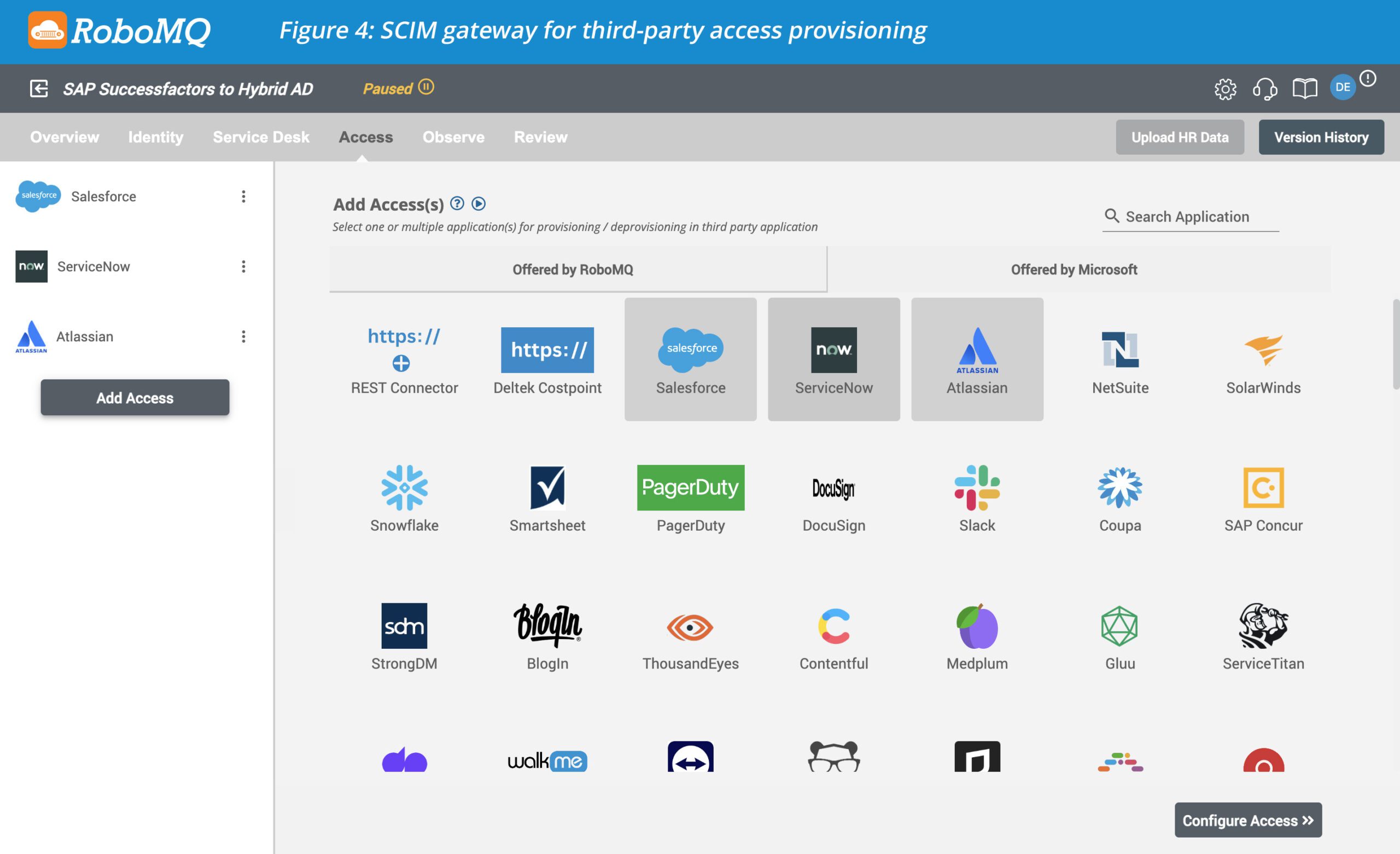
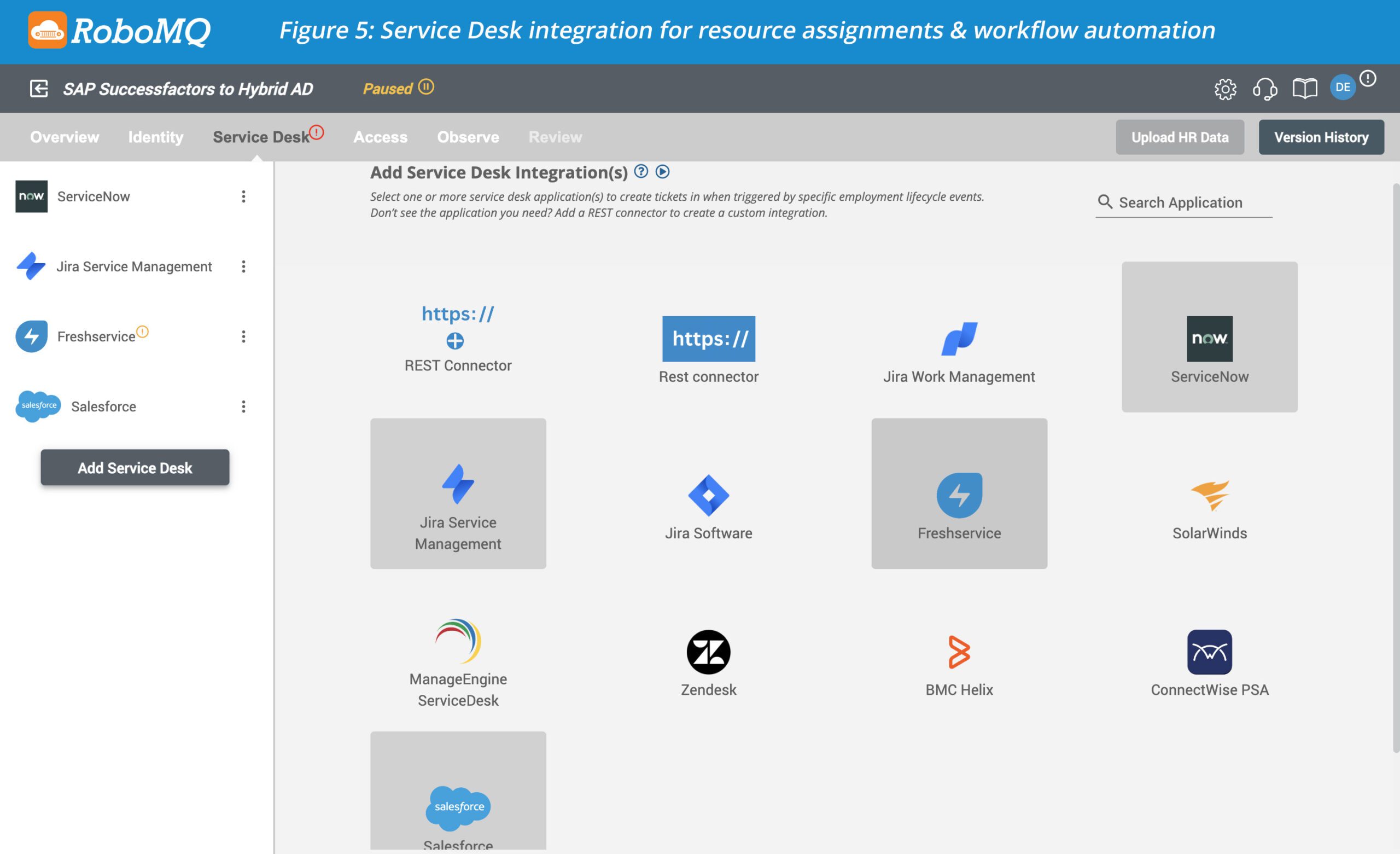
Employees should have access to the key systems and applications they need for their role and shouldn’t have access to the ones they don’t. Hire2Retire automates identity and access management (IAM) through its industry-leading Role-Based Access Control (RBAC). Hire2Retire also provides hundreds of SCIM Connectors to auto-provision employee access to third-party applications based on their role. For companies looking for SAP SuccessFactors to FreshService integration or SAP SuccessFactors to ServiceNow integration, Hire2Retire also connects to them and other popular service desks.
Hire2Retire uses SAP SucccessFactors as a source of truth (SOT) for employee identity lifecycle management. It receives employee profile information including Basic PII for account creation, job–related information to assign role-based access privileges, start date, and last day worked to determine the lifecycle stage, and reporting information to make sure the Global Address List (GAL) and org chart is always current.
Here’s how to set up a Hire2Retire integration in just 4 easy steps:
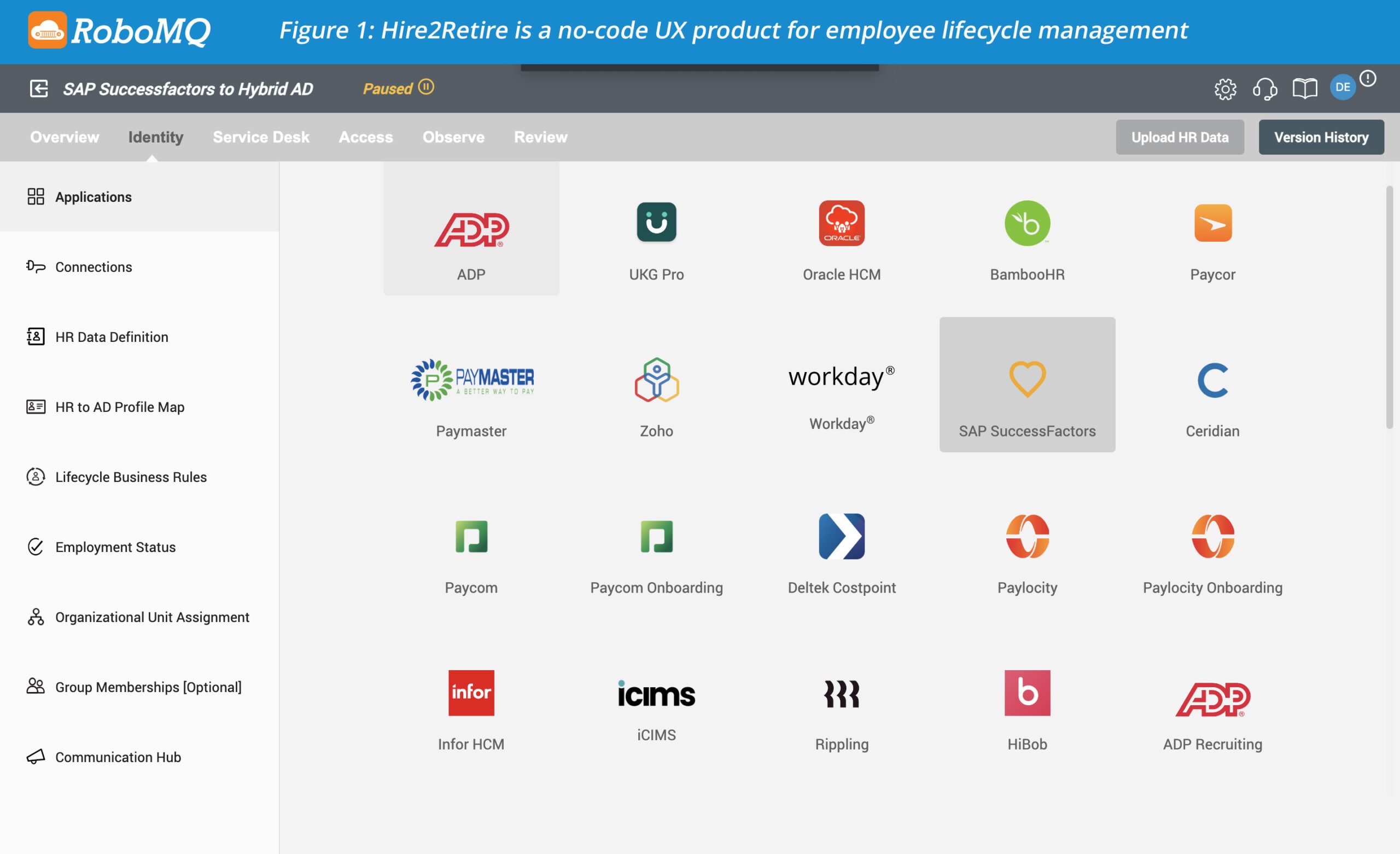
Hire2Retire can connect SAP SuccessFactors to the following Identity Provider (IdP) setups:
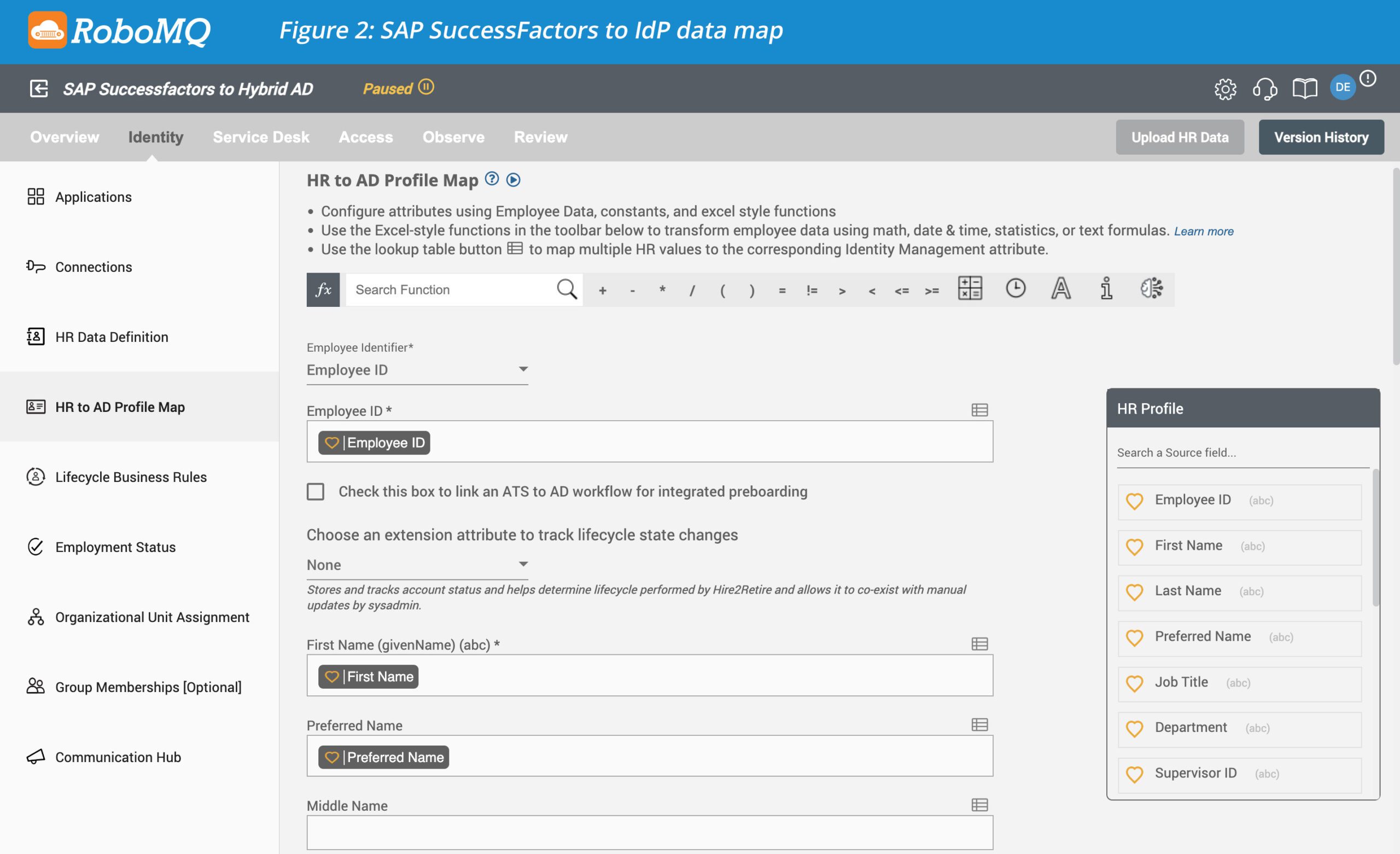
This is the most important step where you would define your own business process as to how you onboard employees, assign UPN or email, manage role-based access control, handle terminations, and perform access and resource assignment or de-provisioning. You can do all of this without a single line of code on our simple intuitive UX by simply making choices on dropdowns, checkboxes, and radio buttons.
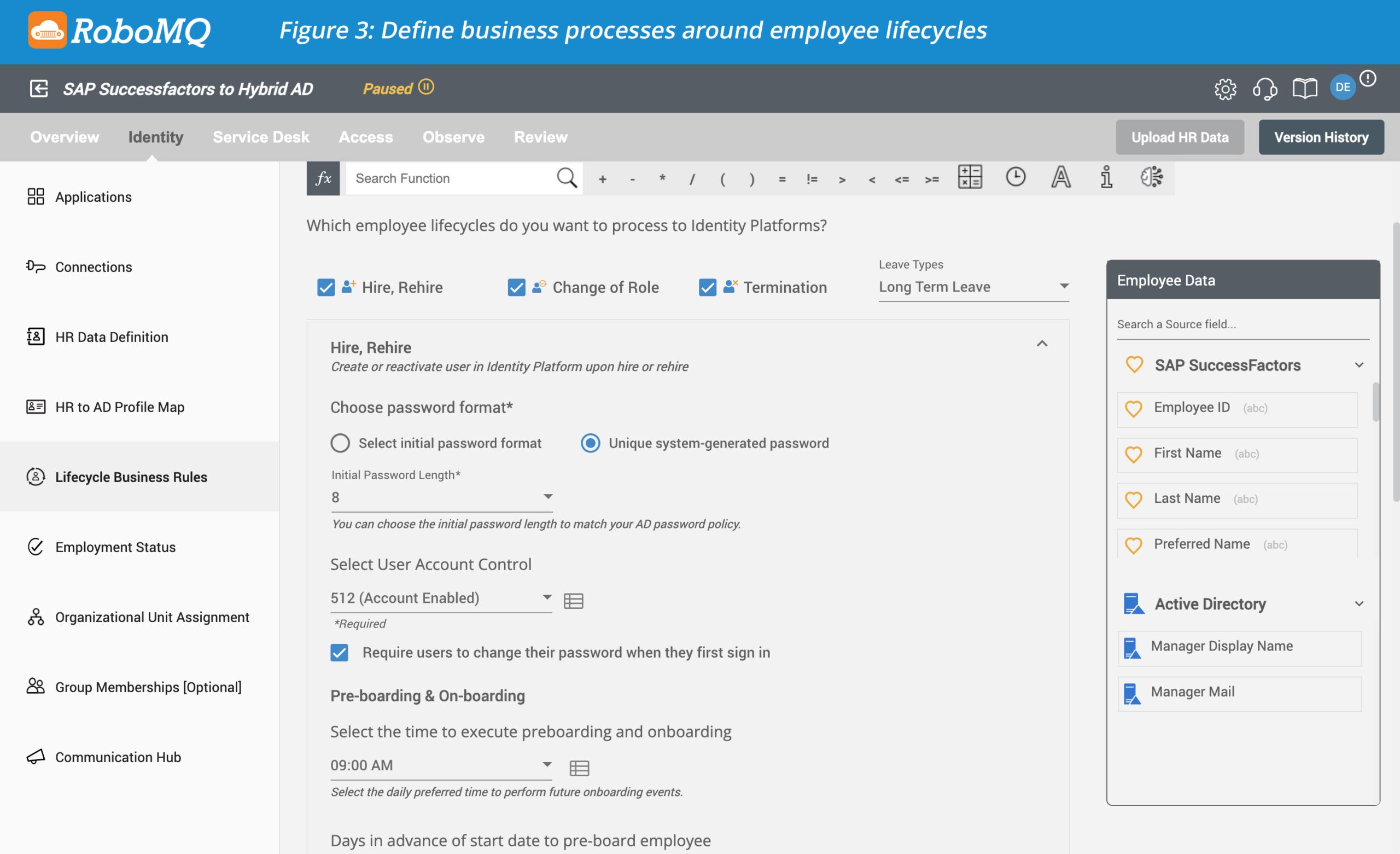
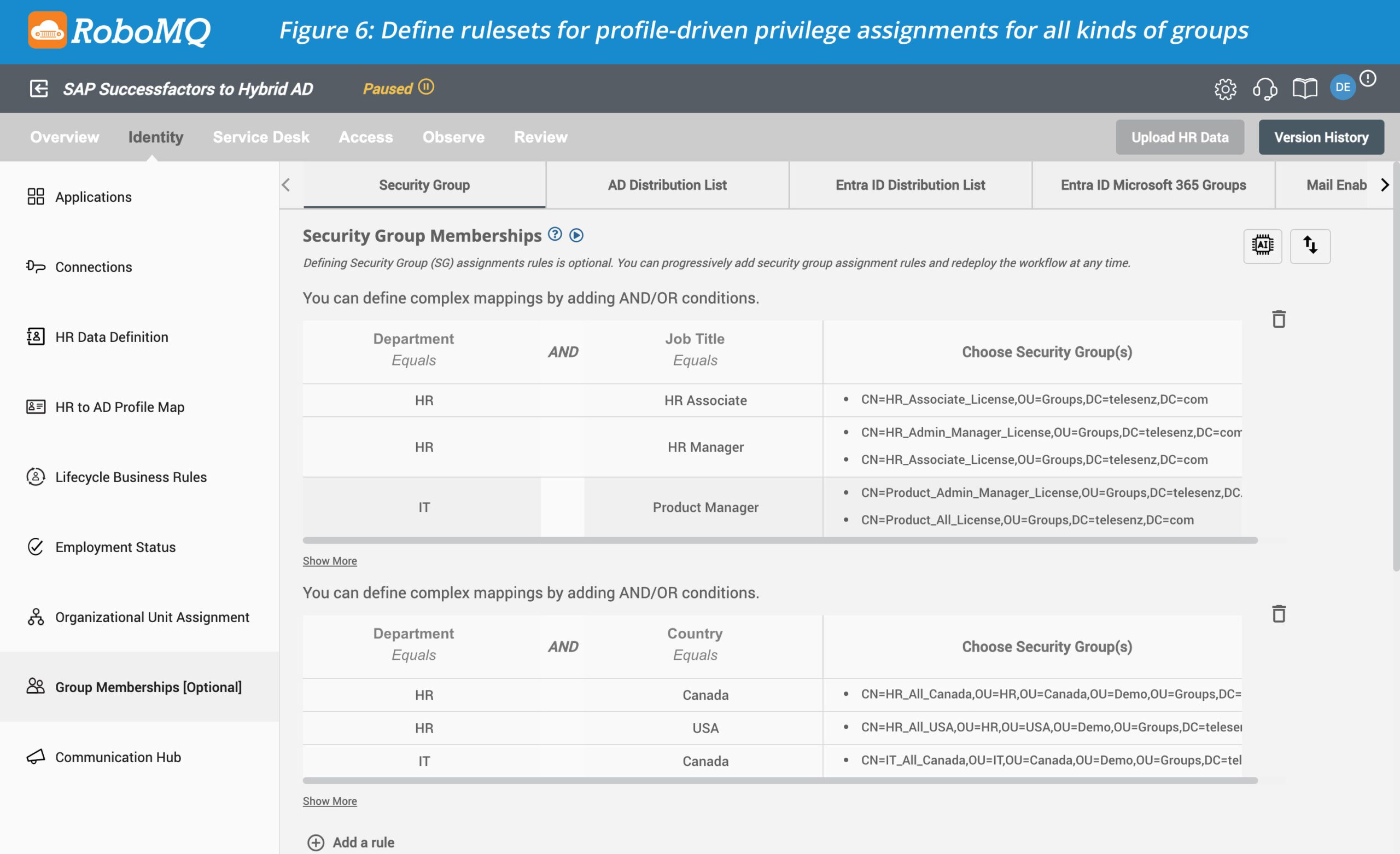
Profile–driven rule-based assignment of privileges through group memberships in a core feature to implement “need to know” basis access and assignment of resources. Hire2Retire’s industry-leading RBAC is an optional but highly recommended part of the Hire2Retire setup process. By using AND/OR conditions, you can create rulesets using one or more employee profile attributes to assign memberships to security groups, mail-enabled distribution lists, Microsoft 365 groups, and more. The choices or the groups that you can manage memberships of depend on your Identity Provider (IdP) Setup.
Integrating SAP SuccessFactors to AD and Entra ID (Azure AD) with Hire2Retire automates employee identity lifecycle management, providing a superior “First Day at Work” employee experience, enhancing data security, and saving time and money. It’s no surprise that over 115 companies use Hire2Retire to sync employee profiles to AD, Entra ID, and Google Workspace.
Connecting SAP SuccessFactors to AD makes sure employee information is always up to date across systems. This saves HR and IT teams from doing repetitive work and reduces mistakes.
New hires are given the access they need automatically based on their role. This means they can start working right away without waiting for manual setup.
When an employee leaves, their system access is removed automatically. This keeps sensitive information safe and saves IT teams from extra work.
Employees are added to the right groups and email lists automatically based on their role and department. This ensures everyone has the access they need without manual updates.
Yes. Even with large teams or multiple departments, access and employee information are kept accurate and consistent, making life easier for HR and IT teams.