Employee lifecycle events rarely begin and end on a single day. A new hire’s laptop is typically prepared days before their first day. Managers often need reminders before an employee leaves to plan knowledge transfer and collect company assets. HR may want confirmation emails after onboarding to verify that access has been provisioned correctly, while IT teams may schedule follow-up activities after role transitions to ensure previous permissions have been removed.
These activities are all part of the same workforce lifecycle event, but they don’t belong to the same point in time. Hire2Retire already automates workforce lifecycle processes across identity provisioning, group assignments, and communication workflows. With flexible event-based scheduling, organizations can now define exactly when each email notification should execute relative to a workforce event, allowing every workflow to follow its own operational timeline.
Current Challenges in Workforce Lifecycle Automation
As organizations grow, workforce lifecycle management becomes increasingly complex. A single onboarding, termination, or role transition often involves multiple teams, business functions, and systems, each operating on its own timeline. While organizations automate lifecycle events, coordinating the activities surrounding those events remains a significant operational challenge. Some of the most common challenges include:
1. Preparing Teams Before the Event
Many workforce activities need to happen before an employee’s start date or last working day. IT must provision accounts and prepare devices, managers need time to plan onboarding or knowledge transfer, and HR must ensure everything is ready. Without properly timed automation, these tasks often rely on manual coordination.
2. Managing Multiple Stakeholders
Every workforce lifecycle event involves HR, IT, managers, security teams, and employees. Each stakeholder requires different notifications or actions at different stages of the process. Coordinating these communications manually increases the risk of delays and missed tasks.
3. Keeping Follow-Up Activities on Track
Work doesn’t end when an employee joins, leaves, or changes roles. Managers may need post-onboarding check-ins, IT teams may have to validate access changes, and HR may require confirmation that all lifecycle tasks have been completed. These follow-up activities are often overlooked when they depend on manual reminders.
4. Reducing Manual Coordination
Many organizations still depend on spreadsheets, calendar reminders, or separate scheduling tools to coordinate lifecycle communications. As the workforce grows, these manual processes become difficult to maintain and increase administrative overhead.
5. Ensuring Consistent Execution
When notifications and communication workflows aren’t aligned with business timelines, onboarding can be delayed, offboarding activities may remain incomplete, and critical communications can be missed. Maintaining a consistent employee experience becomes increasingly difficult across multiple teams and locations.
Automating More Than the Event
A workforce lifecycle event often triggers multiple downstream activities involving HR, IT, managers, and employees. Some actions need to happen before the event to prepare teams. Others are required on the event date, while several follow-up tasks naturally occur after the event has been completed.
Hire2Retire gives administrators the flexibility to configure every communication workflow independently. Whether it’s an onboarding email, a reminder email, or a post-transition confirmation, each template can follow its own execution schedule while remaining part of the same workforce lifecycle process.
Schedule Workforce Lifecycle Emails with Flexible Timing
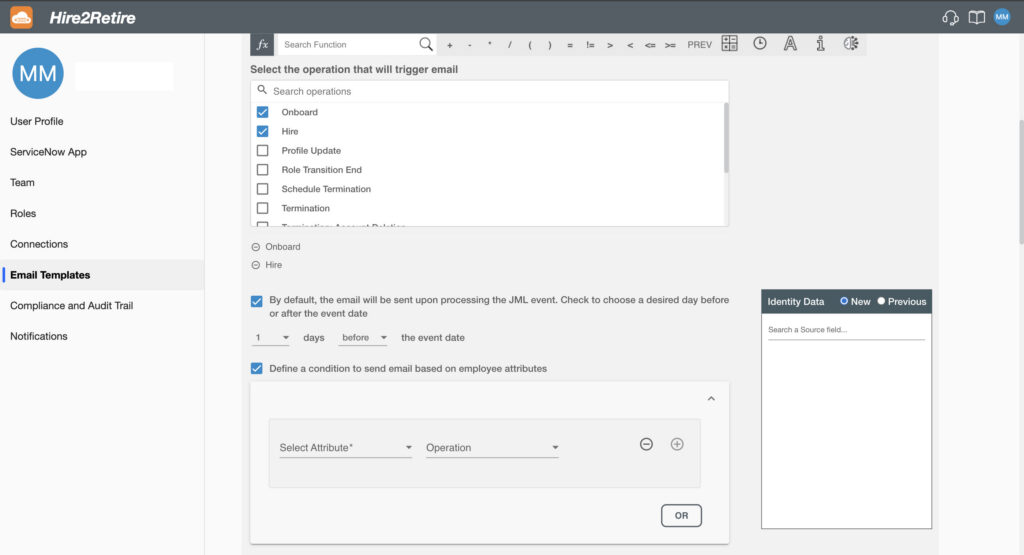
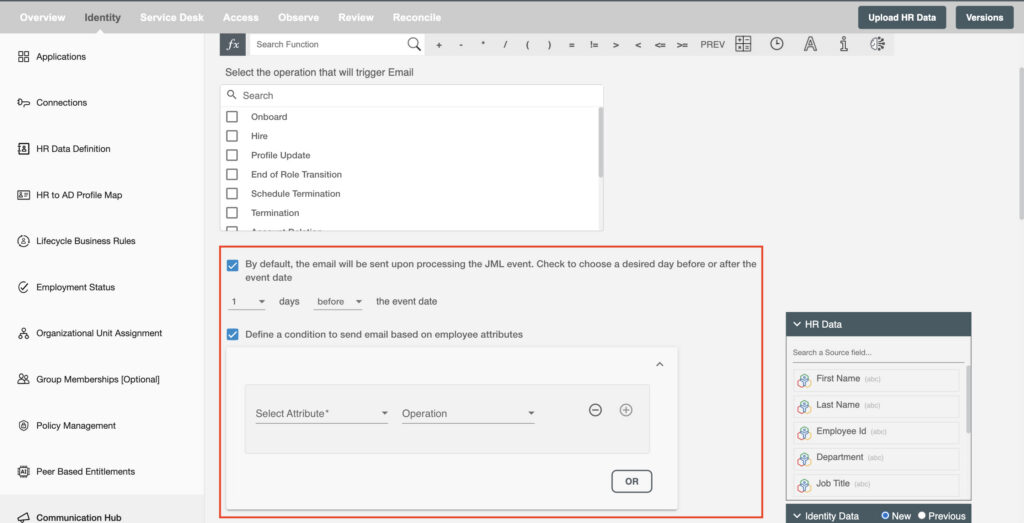
Hire2Retire supports configurable scheduling for Communication Hub workflows. For every email template, administrators can choose whether it should run:
Each email template maintains its own execution schedule, allowing multiple communication workflows within the same lifecycle event to operate independently. For example, a single onboarding workflow could include:
Every action is configured once and executed automatically based on its defined schedule.
Where Event-Based Scheduling Makes an Impact
1. Onboarding Preparation
Employee onboarding often begins well before Day One. IT teams may need time to prepare devices, provision accounts, assign software licenses, or notify managers about upcoming joining dates. By scheduling these activities in advance, organizations can reduce last-minute coordination and ensure employees are productive from their first day.
2. Employee Offboarding
Employee exits involve several coordinated activities across departments. Managers may require advance notifications for knowledge transfer, while IT teams often need to initiate asset recovery, license cleanup, and access reviews. Scheduling these notifications before or after the employee’s last working day helps ensure every step is completed on time.
3. Role Transition Management
Role changes frequently require both pre-event planning and post-event validation. Managers can receive advance reminders before access changes take effect, while follow-up notifications after the transition can confirm that previous permissions have been removed and new access has been provisioned successfully.
Configure Multiple Emails for a Single Event
Not every workflow associated with a workforce event shares the same priority. Hire2Retire allows organizations to configure multiple email templates within a single lifecycle event, with each template following its own schedule. For example:
Each workflow is executed automatically according to its configured timeline without requiring manual intervention or separate scheduling tools.
Business Impact of Event-Based Email Scheduling
Event-based email scheduling creates measurable business value by improving coordination across HR, IT, and management teams. Workforce activities rarely happen on a single day, and communication must follow the same operational timeline. When emails are triggered before, on, or after an employee event, teams can prepare in advance, complete actions on time, and avoid last-minute dependencies.
This leads to faster onboarding, more controlled offboarding, and smoother role transitions. It also reduces manual follow-ups, minimizes the risk of missed communications, and improves process consistency across departments and locations. As organizations scale, well-timed automated communication helps maintain operational efficiency, strengthens accountability, and supports a more reliable and professional employee experience.
Final Thoughts
Successful workforce lifecycle automation depends on more than automating employee events, it depends on coordinating every task that surrounds them. By enabling organizations to schedule emails before, on, or after workforce lifecycle events, Hire2Retire helps HR and IT teams execute onboarding, offboarding, and role transition workflows with greater precision and less manual coordination.
Whether you’re preparing for a new hire, managing an employee exit, or validating access changes after a role transition, every communication workflow can be scheduled to support the way your business operates. Ready to simplify workforce lifecycle automation? Book a demo with our experts to see Hire2Retire in action.