Workforce 360 provides a centralized view of employee identity profiles, and Access Data is one of the most critical data types to ensure security, compliance, and risk management.
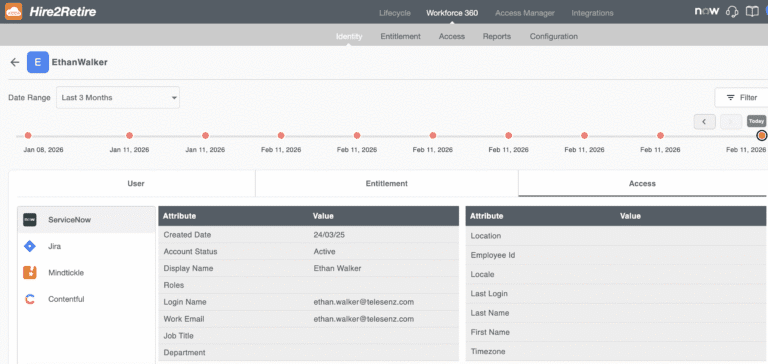
With the most recent software update, Workforce 360 access data allows administrators to view all access levels assigned to an employee on a single screen. In addition, the consolidated view includes the current status of access and the date when the employee originally received access.
This new feature helps teams complete timely access audits, generate accurate reports, and maintain compliance with regulations, providing a straightforward way to manage employee access.
Why is Access Data Visibility Important?
Employees are granted access across multiple applications, systems, and platforms. It is possible for a small error, like people being assigned the wrong role or someone having their account yet to be deactivated, to expose the organization. It can cause either a security issue or a compliance issue. When there isn’t a consolidated view:
IT teams don’t know who has the highest-privilege access
Compliance teams can’t certify employee access in a timely manner
Human Resources and Operations cannot confirm which accounts are still active or disabled
With the new ‘Access Data’ feature in Workforce 360, you can view all employees’ access privileges at the application level from a single location.
Workforce 360 - Access Data
Fig: Employee Details with Access Data
Access Data is included with Workforce 360. It is located under the Workforce 360 Identity module and consists of 3 sections:
User Attributes - HR and Identity data for employees
Entitlements - Lists all entitlements, groups, and memberships connected to AD, Entra, M365, Mail-Enabled Groups
Access - Tabs show which applications users have the right to access.
Primary Features
Application-specific Tabs: Each application (e.g., Salesforce, HubSpot, ServiceNow, etc.) has its own tab for quick access and easy navigation.
Multiple Filters: Filter by Access Attribute, Role(s), and Application(s) with the ability to use AND/OR logic to create combinations of filters.
Employee Detail Page: Clicking on a user displays all Access Attributes assigned to that user.
Active Accounts Displayed by Default: All active accounts are displayed by default, but users can also view inactive accounts and deleted accounts.
Unique Identifiers for Each Record: All Access records are displayed with unique identifiers, e.g., Email Address.
Synchronization Time: Third-party changes are synchronized with this application within 30 minutes of the next sync.
Key Use Cases
Admins for Target Applications - Find users with high privilege roles. For example, filtering Role as 'Admin' in Jira will result in listing all active Jira administrators.
Auditing Disabled Users - Quarterly review by filtering Status as ‘Disabled’ will provide you with a list of users that haven't logged in recently.
Tracking Changes to Attributes - The timeline view shows when a user's attributes (like Roles) were last changed and when they were last modified.
Applications With No Assigned Members - Quickly locate applications with no assigned users to help you streamline usage and clean up application assignments.
Additional Capabilities and Data Handling
In addition to the Identity Detail Page, Workforce 360 also introduces a dedicated Access menu, available alongside Identity, Entitlements, and Configuration. This view presents access data grouped by application, allowing administrators to quickly understand which users have access to each connected system.
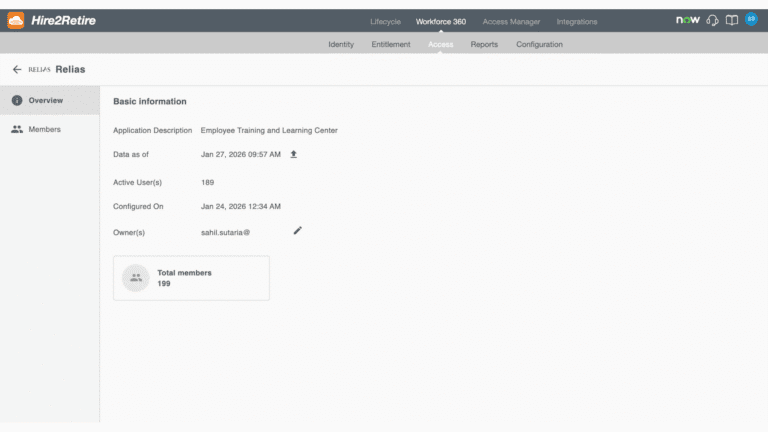
Fig: Access Overview UI
Access data displayed in Workforce 360 is retrieved directly from the connected target applications, ensuring that the information shown reflects the most accurate state of user access, independent of Hire2Retire workflows.
For disabled and deleted users, Workforce 360 continues to display the last successfully synced identity and access data, helping teams retain historical visibility during audits and investigations.
Filtering and visibility of access attributes are driven by application-specific metadata, which determines which attributes are searchable, filterable, and displayed for each application. This ensures consistent and accurate access to representation across different systems.
Front-End and Design Functionality
Identity Tab Layout: This area is divided into three parts: User Attributes, Entitlements, and Access
Application Overview: This area contains a quick summary of the application, its description, last synced date, how many active users have access to it, total members with access, when it was configured, and the owner of the application
Filters and Searches: Users can find employees or applications quickly using combinations of different searches and filters
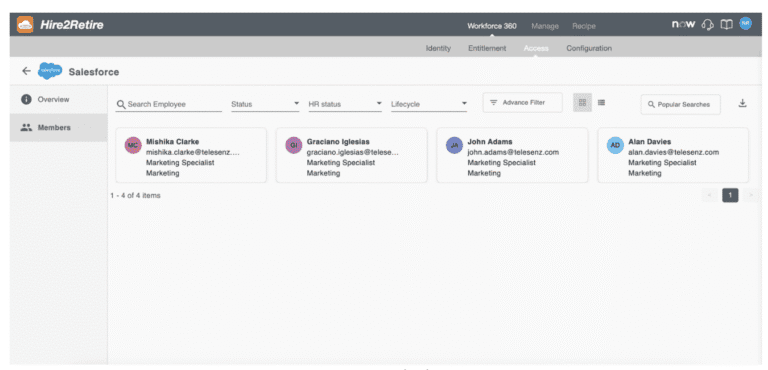
Access Detail Pages: This section provides a complete listing of employees with access to each application
Fig: Access Member List UI
Through the Access Data feature, all users will have easy access, and filtering capabilities to find information regarding users and user rights within the context of multiple systems. All teams (HR, IT, Security) can easily manage and view employee access to all systems.
How This Will Benefit Your Business?
Incorporating Workforce 360 Access Data will help organizations easily manage employee access privileges, while increasing visibility, compliance, and risk management. Using this data, organizations will be able to:
Audit and verify employees’ access rights easily.
Quickly identify how many users have outdated/redundant access rights.
Create a centralized view for access rights across all applications.
Eliminate manual tracking and reporting of employee access.
With real-time access data, the IT, HR, and Compliance teams can prevent problems with employee access rights instead of waiting until there is an issue to be addressed.
View Workforce 360 Access Data in Action
The Access Data functionality has been added to Workforce 360 in the latest release for all Workforce 360 users. Find out how Workforce 360 provides complete visibility into employee access and improves your identity management processes.
Access Data is a feature in Workforce 360 that provides a centralized view of employee access across connected applications, including access status, roles, and entitlements.
Workforce 360 Access Data is useful for IT, Security, Compliance, HR, and Operations teams that need visibility into employee access for audits, reviews, and access management.
Yes. Workforce 360 continues to display the last successfully synced access data for disabled and deleted users to support audits and historical reviews.
No. Access Data is retrieved directly from connected target applications and is displayed independently of Hire2Retire workflows, ensuring accurate visibility into actual user access.
Swati Gole is a Marketing Specialist at RoboMQ. She blends creativity with strategy to craft meaningful brand experiences. With a background in digital marketing and communications, she creates stories and campaigns that connect with people and drive growth across web, social, and new-age digital platforms.
Swati Gole
Swati Gole is a Marketing Specialist at RoboMQ. She blends creativity with strategy to craft meaningful brand experiences. With a background in digital marketing and communications, she creates stories and campaigns that connect with people and drive growth across web, social, and new-age digital platforms.
Our website uses cookies. By continuing to browse the website you are agreeing to our use of cookies. For more information on how we use cookies and how you can disable them, please read our Privacy Policy. I Accept.