Each event in the employee lifecycle creates a growing backlog of manual Active Directory tasks. Here’s how Hire2Retire eliminates it.
When a company expands its department or restructures teams, the number of identity updates in the Active Directory increases significantly. Handling AD updates manually slows onboarding, delays access provisioning/deprovisioning, and creates security gaps that IT teams cannot afford to overlook.
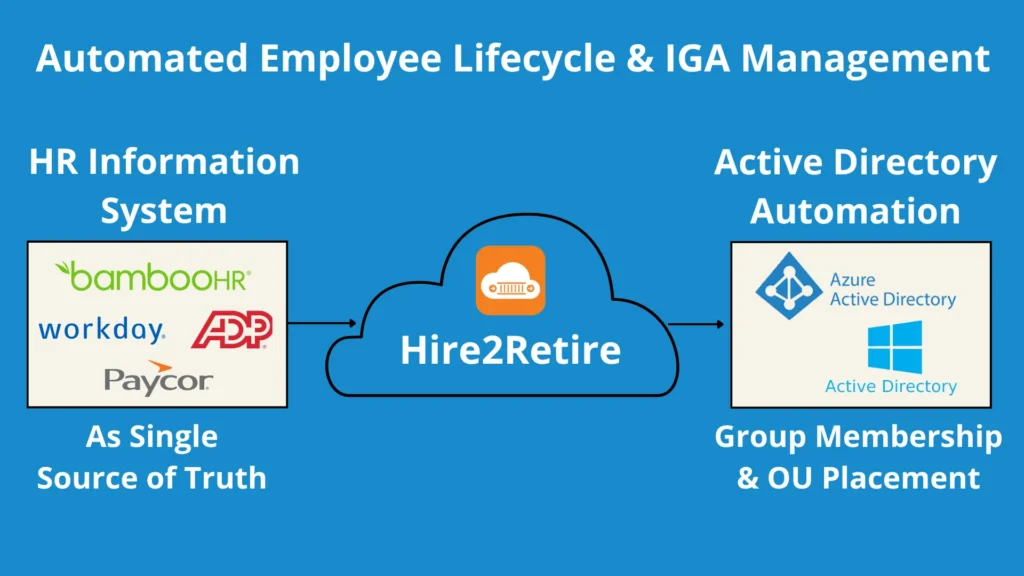
However, by connecting your HRIS directly to Active Directory, Hire2Retire automates Organizational Unit (OU) placement and Active Directory (AD) group management throughout the employee lifecycle. By doing so, Hire2Retire frees you from manual service request tracking and updating, making sure your AD remains accurate with HR data.
Before diving straight into how Hire2Retire automates OU placement and Active Directory Group membership, let’s understand the core concepts.
Active Directory (AD): AD acts as the pillar of Identity and Access Management (IAM) for most organizations. It is a directory service that centrally manages users, group memberships, attributes, network resources, and accounts with a robust authentication and authorization process.
Organizational Unit (OU): An OU is a container within Active Directory that provides IT admins a hierarchical structure for logically grouping objects like users, groups, and computers by department or location. It is the central point for Group Policy Objects (GPOs), which help control security settings, access rules, and software deployments.
Active Directory (AD) Group Membership: AD groups simplify the administration of user accounts in different domains by sorting and assigning access rights from one place. It controls which file shares, applications, and email lists a user can access. AD has two primary group types, i.e., distribution group and security group.
Here’s a side-by-side comparison of organizational unit and group membership in Active Directory that highlights their key differences:
| Dimension | AD Organizational Unit (OU) | AD Group Membership |
|---|---|---|
| Purpose | Organizes objects and links them to group policy objects (GPOs) | Grants resource access permissions to users |
| Delegation | Supports delegation of administrative tasks | Does not support administrative delegation |
| Group Policy | GPOs can be applied to OUs for policy enforcement | GPOs cannot be applied to groups |
| Access Control | Controls access to objects within the AD database | Manages access to network resources |
For every new employee, someone from the IT team must place them in the correct OU, assign the right AD group membership, and confirm access is ready before their first day. That’s three manual steps per person.
The same complexity applies to internal movements. During transfers and promotions, admins have to remove old permissions while assigning new ones instantly that align with the user’s current responsibilities. Missing even one will lead to either an access gap or a privilege that shouldn’t exist.
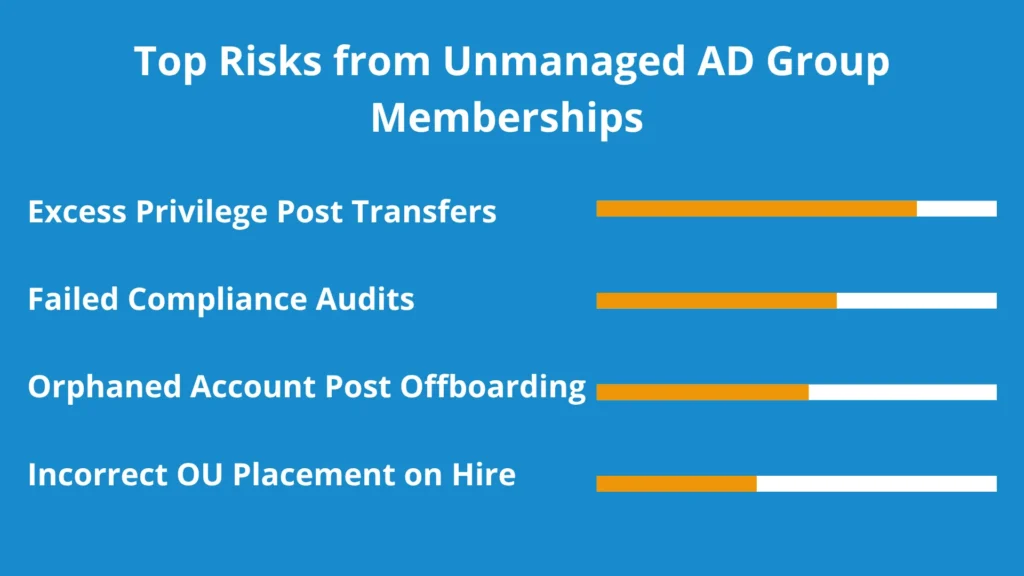
During terminations or offboarding, the stakes are even higher because IT admins must revoke all access immediately. Any delays can create entry points that former employees or external actors can exploit.
Without a centralized source of truth, the process becomes error-prone and inconsistent. This often results in:
According to the Verizon 2025 Data Breach Investigation Report, 88% of breaches involved compromised credentials and privilege misuse. Both of which are directly tied to inaccurate or unrevoked AD group memberships.
Many IT teams still rely on scripts to audit or remove inconsistencies in AD. But these scripts only work until role changes, org structure shifts, or the admin who worked on them leaves.
However, a rule-based automation system like Hire2Retire applies the same logic at scale, every time, without maintenance overhead or dependencies on one person.
Hire2Retire integrates with leading HRIS platforms, such as BambooHR, Workday, ADP, and Paycor, allowing HR data to flow straight into AD without manual handoff.

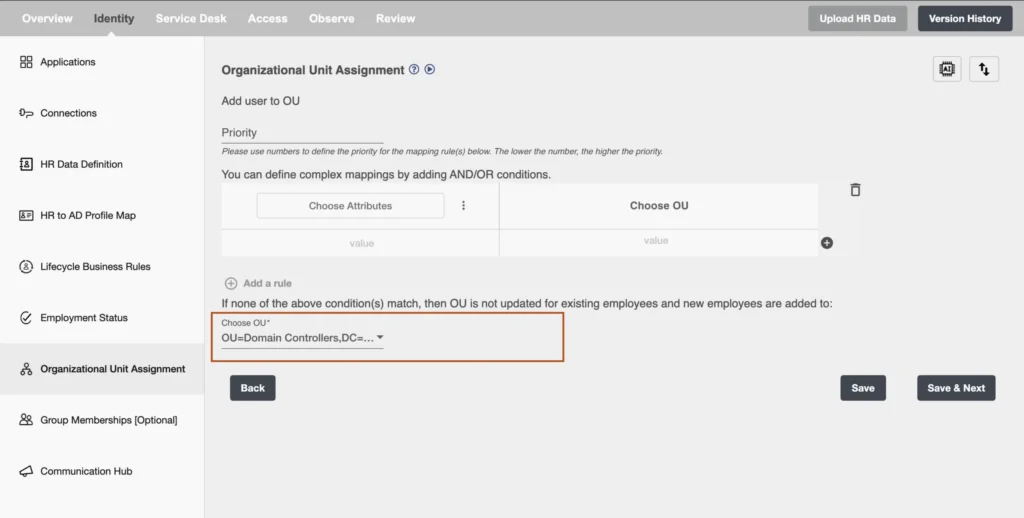
Hire2Retire uses a rule-based engine to map HR attributes like department, job titles, location, and employment type directly to the OU in Active Directory. In a multi-domain controller setup, an OU can be assigned to the user from any of the base domains depending on the condition. To achieve that, each rule is assigned a number to set the priority for mapping. The lower the number, the higher the priority. Hire2Retire also allows adding filters using ‘AND’ and ‘OR’ logic to set customized OU assignment rules.
For example, when a rule reads: if a Department equals Finance AND Job Title contains Manager, place in OU=Finance-Mngmt, DC=corp, DC=com. However, if only Department equals Finance, place the user in OU=Finance, DC=corp, DC=com.

Hire2Retire also comes with a mandatory default OU, which acts as a fallback. So, when a user doesn’t match a custom rule requirement, they automatically get placed in the default one.
The AD security group membership works similarly. IT teams define rules using HR attributes and use AND/OR logic to assign the right AD groups to the right employees. When someone’s job title or department changes, Hire2Retire automatically removes old group memberships and assigns new ones in real time with no manual input.
During employee offboarding, Hire2Retire removes all the AD group memberships the moment a termination is processed in the HRIS. So, there’s no ticket to raise, no delays, and no risk of a former employee retaining system access.
Alongside conditional rules, admins can also define default security groups for all users in the organization.
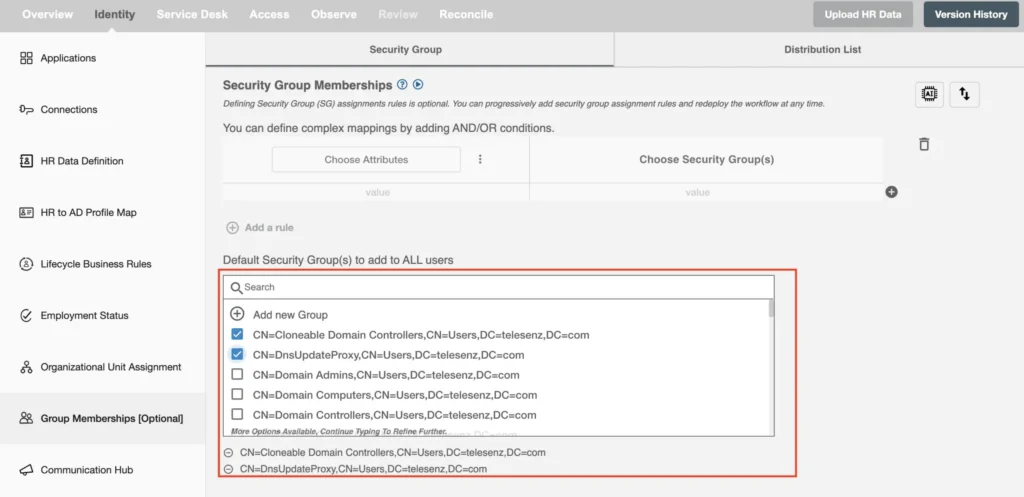
Admins can create new AD security groups within Hire2Retire at design time. All they have to do is click on Add New Group and fill in the group details like group name, scope, OU location, and optional owners. All group mapping can be exported as timestamped .csv or .xlsx files for version and audit readiness.

When AD group memberships and OU placements are managed automatically, the impact can be seen throughout the workforce lifecycle:

Manual AD management was never sustainable; it only seemed to work until the organization grew. Misplaced OUs, outdated group memberships, and access that outlasts employment are all signs of a process that relies too much on manual efforts.
Hire2Retire keeps the OU placements and Active Directory group memberships accurate, automated, and audit-ready across every stage of the employee lifecycle.
If your team is still manually managing Active Directory group membership and OU placement, it’s time to move to a rule-based, lifecycle-driven approach with Hire2Retire.
Explore how Hire2Retire can automate your entire identity lifecycle.
Use the Active Directory Users and Computers (ADUC) console or PowerShell command Get-ADPrincipalGroupMembership to check AD group memberships. For continuous, real-time accuracy, Hire2Retire syncs group memberships directly from the HRIS, removing the need to run manual checks.
A GPO centralizes the management and configuration of applications, operating systems, and user settings within an Active Directory environment. GPOs are applied at the OU level, which is why correct OU placements directly determine which access user inherits.
Automation instantly assigns users to the right OUs and groups based on predefined rules tied to HR attributes. This eliminates delays, reduces misconfiguration risks, and ensures access is always aligned with the employee’s current role.
Hire2Retire integrates with leading HR systems, IT service management platforms, and identity governance tools, acting as a centralized data source that keeps Active Directory in sync with HR data.
Automating AD group membership with Hire2Retire directly cuts IT provisioning hours, reduces compliance risk, and speeds up onboarding. To check exactly how much money you can save with Hire2Retire, use our ROI calculator.