Summary: Duplicate user accounts in Active Directory can create security risks, conflicting permissions, unnecessary licensing costs, and compliance challenges. This blog explains how to identify and safely remove duplicate accounts, understand their root causes, and prevent future duplication using HR-driven identity lifecycle automation like Hire2Retire.
Most of the time, the problem with duplicate user accounts in Active Directory doesn’t become visible until some complications occur. In some cases, former employees retain access to company systems. Also, audits may reveal multiple accounts assigned to a single user. This can lead to access issues, including failed logins caused by duplicate accounts with similar permissions.
It’s common practice for most companies to have such problems with their employees. The thing is that Active Directory allows duplicates for all user attributes. As a result, a user may end up with multiple accounts due to involvement in different operations within the company. It becomes challenging to monitor access and manage permissions if there are two accounts with different permissions.
The reason behind this is that the information in HR and IT systems can be inconsistent, leading to multiple accounts and a lack of monitoring of them by management or security professionals. It results in the creation of several user accounts for one employee with specific permissions.
In this blog post, we will discuss how duplicate user accounts in Active Directory are created and what risks they can pose for the business, as well as how they can be found and avoided.
To solve a problem, you need to know how it appeared. Duplicated identities don’t just pop into Active Directory accidentally. They appear when the process of managing employee IDs becomes disconnected and inconsistent. The main causes are as follows:
The pattern here is clear. HR knows what happened to an employee. IT may not necessarily know about it. Tools like Hire2Retire bridge that gap by integrating directly with your HR system and updating user identities automatically. The result? Duplicate user accounts in Active Directory stop forming before they become a problem.
It is easy to consider AD duplicate user account management as merely a tidying-up exercise, but this is not the case. Failure to manage duplicate user accounts in Active Directory can lead to unauthorized access and data breaches.
Before moving to identifying and removing duplicate users in Active Directory, it is essential to comprehend what “duplicate” means in your environment. There are several attributes for which Active Directory will force uniqueness for, like sAMAccountName (Security Account Manager) and SID. At the same time, Active Directory does not ensure uniqueness for other properties, like display name, email address, or employee ID. Therefore, a person might have two accounts without getting any alerts from the system. Here are some possible approaches:
You can use a free utility offered by Microsoft . It scans your on-premises AD and identifies potential synchronization issues with Entra ID (formerly Azure AD), including duplicate UPNs and proxy addresses.
The removal process is delicate since deleting the wrong account prematurely may result in data loss, emails, files, or access rights in your organization. Thus, you should follow these steps to remove duplicate user accounts.
First thing to remove duplicate users in active directory is to figure out which of the two is the account to keep. Review both accounts and compare them against your HR system. Whichever one matches up correctly as far as the position of the employee and her current department, and the last recorded data is concerned, will be the correct choice.
It’s crucial to avoid losing any valuable access when performing your task. Review the group membership of the duplicate account and make sure to grant access to those groups on the correct account.
Another thing you can do to remove duplicate users in active directory is don’t go ahead and delete the duplicate account. Rather, first disable it and put it in another OU for holding for anywhere from 30 to 90 days. In case nothing bad occurs in that timeframe, feel free to finally remove it from the network.
Proper documentation of what happens during this process will help you stay organized and avoid making mistakes. You’ll want to note which accounts you’ve merged, what date they’ve been merged on, and who did it exactly.
When deciding whether to disable or remove an account, make sure to first determine if it isn’t used as a service account. Sometimes you might mistake one of these for duplicates when they are in fact used to run applications or scheduled tasks.
Instead of dealing with duplicate accounts after they appear, the better approach is to prevent them from being created in the first place.
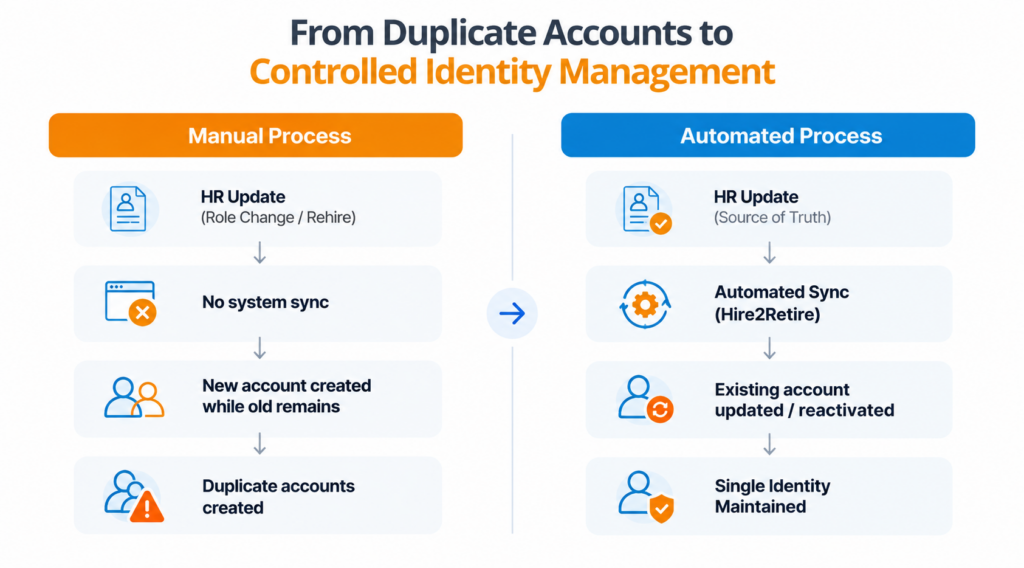
Fortunately, Hire2Retire by RoboMQ is designed specifically to address this challenge. It seamlessly integrates your HR system (Workday, BambooHR, SAP SuccessFactors, ADP, or other) with Active Directory, Azure AD, and Google Workspace. New employee records created by the HR system are automatically turned into an account in Active Directory. Role and departmental changes trigger an automatic update in access rights. Departures automatically revoke access as well.
Because everything is HR-driven, there won’t be any duplicate user accounts in Active Directory created by mistake. No IT ticket needs to be filled out manually. Nothing needs to be done twice. And there’s simply no chance of accidentally creating a second account for the same user. That’s made possible by letting HR become the
Even when automation is involved in handling most aspects of the lifecycle of an individual’s identity, there are some instances where duplication may occur for an individual within Active Directory, implying that a long-term hygiene practice remains crucial.
Duplicate user accounts in Active Directory represent the tip of the iceberg when it comes to organizational inefficiencies. While it is possible to deal with the issue directly via scripts and PowerShell tools, duplicate user accounts will keep appearing if HR and IT departments continue to operate separately, without having a source of truth to draw on.
The key is to automate identity management as employees join, move, and leave. Doing so ensures that your directory always contains accurate information, without ever requiring you to go into panic mode at the end of each quarter.
If you are sick and tired of constantly cleaning up duplicate user accounts in your Active Directory, it may be time to take a more holistic approach to dealing with the issue once and for all. Book a demo today to find out why Hire2Retire represents the perfect solution to this common problem.
No, Active Directory ensures unique sAMAccountName and SID values; however, multiple accounts can exist within AD per a single person, thus duplicates can be discovered by analyzing AD data against the data in your HR system.
First, it is safer to disable it than delete the account. Then move it to the quarantine OU, give access where necessary, etc. Wait for at least 30 days, and after that, you can delete it if nothing happens.
Having multiple accounts and duplicate accounts will make it hard to identify access to any system. If an auditor needs to see that someone doesn’t have access or check any other information, it becomes hard due to duplication.
It depends. Hire2Retire helps avoid duplicates but does not solve existing duplicates (which usually should be solved before or during the installation). HR-based automation helps prevent such duplicates further.
The system checks whether an account already exists for that person. If yes, it will reactivate the account rather than create a new one.
To identify duplicate user accounts in Active Directory, compare attributes such as employee ID, email address, and username against HR records. Once identified, determine which account to retain, review and preserve the required permissions, and disable the duplicate account before deleting it. To prevent future duplicates, use HR-driven identity lifecycle automation, such as Hire2Retire, to keep employee information synchronized across HR and IT systems.
The best way to identify duplicate accounts across multiple email addresses is to compare unique identifiers, such as employee IDs, usernames, and HR records, rather than relying on email addresses alone. Use Active Directory PowerShell scripts or identity management tools to detect accounts belonging to the same person. Review their group memberships, permissions, and account status to identify duplicates.