When an employee leaves a company, a long list of tasks begins behind the scenes. Documents need to be collected, company property must be returned, and most importantly, access to all systems has to be removed. This last step sounds simple. In reality, it is often the most forgotten, most delayed, and most risky.
Many organizations still follow manual offboarding processes that depend on someone remembering to send an email or update a spreadsheet. When this does not happen on time, the outgoing employee keeps access to company tools even after their exit. This is more common than most companies think. It also creates real security risks.
When offboarding an employee, the biggest challenge for a company’s information security is finding out if and when all previous access to the company’s data will be removed. Many companies will rely on someone on the team to remove a user’s access and to have that done in a timely fashion. As the use of offboarding automation has increased in popularity over the years, the importance of using the right offboarding automation system to ensure compliance is very real.
When an employee leaves, IT teams must disable accounts in all the systems that person had access to. This includes email, HR systems, collaboration apps, file storage, payroll, CRM tools, and many more. In large enterprises, this list can easily include 30 to 50 different systems for a single employee. For employees in technical or senior roles, the number can be even higher.
The problem with a manual offboarding process is that it depends on people. HR might forget to notify IT. IT might not have full visibility of every system the employee used. A manager might delay sending the exit request because they are busy. Or someone might simply not know which access rights need to be removed.
All these delays lead to a common result. Former employees continue to have access to sensitive systems for days or even weeks after leaving. According to a survey, 91% of former employees said they still had access to company files even after they had left the organization. Studies have found that many organizations still struggle with this, often not realizing the risk until it is too late.
Companies must act quickly to remove access when an employee exits. Delays in removing access can lead to failure to meet compliance requirements, which can cause reputational damage to the company. Companies that are proactive in preventing unauthorized access through effective offboarding workflows will protect themselves from fines and litigation.
Offboarding automation solves these problems by making the process reliable, consistent, and fast. It removes the dependency on manual tasks and eliminates the chance of someone forgetting a critical step.
When an employee exits their role, the HR system automatically initiates an offboarding workflow by removing any access and completing housekeeping tasks from applications integrated into the HR system. This means that there is no ambiguity about when and what will occur with a person’s access, and there is no further action required from individuals who have multiple responsibilities within an organization. This automated process improves security and compliance in several ways.
The most important benefit is that the employee’s access is removed instantly. Their email account is disabled, system permissions are revoked, and access to cloud apps is shut down. This prevents any chance of unauthorized access after the exit.
The system knows exactly which applications were accessed by employees because of automated. There is no more guessing where the employee accessed the information prior to exit or relying on records that were entered by a human sometimes months after the access occurred. Automated offboarding systems can identify and process every account without being reliant on a human’s ability to recall information.
All companies must be able to provide evidence in the event of audits or compliance when they remove access. With automated offboarding there is new log documentation available that contains the trail of actions taken. This provides companies with clear and auditable evidence that they removed access and deprovisioned the identity of employees in a timely manner.
With the use of employee offboarding automation systems, both the HR and IT teams save a tremendous amount of time as previously they would have been required to either create multiple access requests, maintain large sets of data in a spreadsheet or contact staff multiple times to make sure that removal and deprovisioning of identities were being completed in a timely manner. Automated offboarding systems take care of all repetitive tasks allowing the HR and IT departments to devote their resources towards higher priority tasks.
Because access is removed in a timely manner, any sensitive data will remain secure and should prevent any unintentional or intentional misuse of a company’s data.
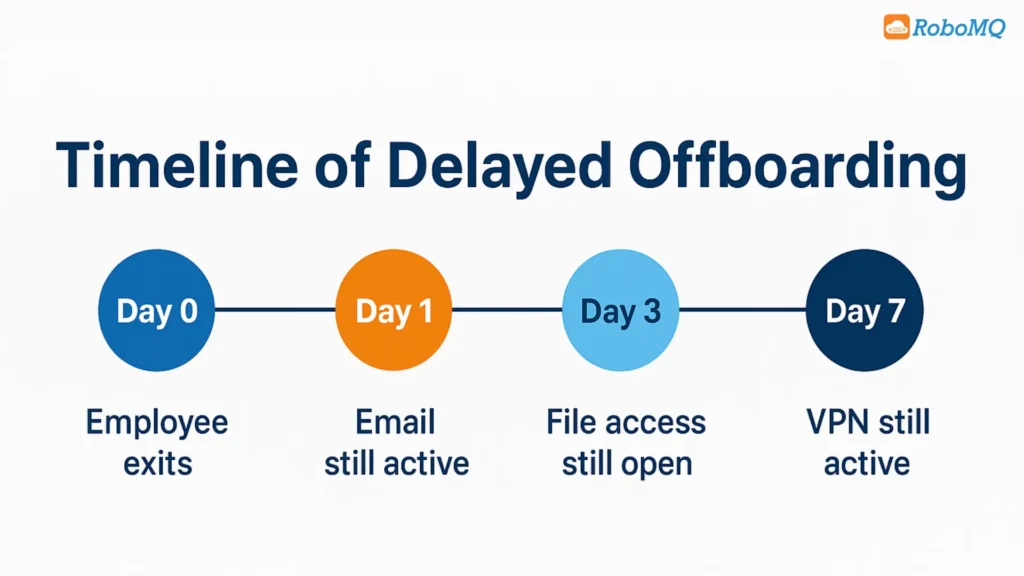
Access risk management is about ensuring that only the right people have access to the right systems. When an employee leaves, their access must not stay active longer than needed. Manual processes increase this risk because they cannot guarantee immediate action.
Offboarding automation strengthens access risk management in three important ways.
It creates a consistent access removal workflow that happens the same way every time. It closes the window of time during which unauthorized access can occur. It gives security teams visibility into who has access and how quickly permissions are removed after exit.
Even a small delay can create a loophole. Automation removes that loophole completely.
Compliance standards exist both externally and internally within an organization (SOC, ISO, HIPAA, GDPR, etc.) Each of these has a common requirement to remove access in a timely manner when an employee departs.
In order to ensure that a company meets this requirement consistently, compliance automation can be utilized. With compliance automation, organizations no longer have to rely on tracking down audit reminders or following up with a checklist—to ensure their system was in compliance with industry standards, compliance automation tracks, logs, and manages this process automatically.
By automating compliance processes, organizations will greatly reduce their compliance risks and significantly ease the burden of being prepared for audits. When auditors request proof of compliance, the IT department can produce a report that details all the actions taken during an employee’s offboarding process, based on timestamps.
The term “Identity Deprovisioning” refers to the act of removing a user’s account from the organization’s system and terminating their able to access it. For an organization with multiple departments, various tools, and numerous roles to fill, deprovisioning a user manually can be an extremely slow and inaccurate process.
When deprovisioning an identity, one of the benefits of using automation is the ability to automate the deprovisioning process. The automation process will utilize workflow(s) and rules that have been set up ahead of time, so the automated deprovisioning process will execute in the same way each time.
For instance, if a salesperson resigns, the automated process will automatically deactivate their access to the CRM system, disable their access to customer data, and terminate their access to any sales-related tools properly and in the right order. On the same note, if a software developer leaves the organization, the automated process can remove their access to any repositories or source code, as well as disable any cloud-based development environments they may have been using.
Inaccuracy can put users and systems at risk because if there is a delay or failure to complete an action, there is an increased chance of a vulnerability occurring. By using offboarding automation to deprovision identity, the organization will eliminate the possibility of leaving behind completed accounts or having residual privileges.
Being prepared for an audit means being completely prepared with a detailed record of all compliance-related activities. When audits are managed via manual processes, the requirements to generate and review audit reports are time-consuming, as they must pull logs from several systems, match timestamps and confirm that all processes were completed in a timely manner.
The automation of offboarding allows organizations to streamline their auditing. The offboarding workflow documents all actions automatically and generates audit-ready reports which provide an accurate history of when accounts were deactivated and what systems were modified in the offboarding process.
In addition to simplifying the overall process of passing audits, the automated offboarding workflow also demonstrates to customers, partners and internal associates that the organization takes the security of its information very seriously.
As companies grow larger, they expose themselves to increasing risks around their offboarding processes. If a company has hundreds or thousands of employees leaving annually, doing this via manually tracking will be virtually impossible.
By automating the offboarding process, an organization can scale their offboarding process and reduce the time and workload required to manage multiple offboardings. An automated offboarding solution does not slow down; it does not miss tasks. All offboardings are processed quickly and accurately.
Organizations who implement employee offboarding automation benefit from:
Together, these items create an organization that is stronger, safer, and compliant.
Offboarding is the last stage of an individual’s life cycle as an employee. It is also one of the least well-regarded phases within the employee experience; as such, most organizations view it as an afterthought. This creates a range of compliance issues and adds unnecessary security risk to organizations.
Utilizing offboarding technology allows organizations to automate the entire exit process. By automating the offboarding process, organizations can establish a consistent, efficient, secure method for managing employee exit processes. Employees at organizations using exposed offboarding technology have the ability to quickly and efficiently log their hours worked during the transition from employee to offboarding; they may easily record duties performed and review history of benefits as well as receive necessary information for their exit.
In addition, with automation and backup documentation of all exit data being created, organizations benefit from a streamlined exit process. With an extensive record of each employee’s exit event making, it simple for compliance purposes, organizations gain an overall increase in credibility and a greater degree of shareholder and customer confidence.
Automated offboarding processes will allow organizations to maintain compliance with established regulations, improve compliance records, accurately track and maintain required documentation, and reduce costs associated with noncompliance with regulations.
Many companies struggle with tracking all the systems an employee used and coordinating multiple teams during an exit. This can lead to delays, missed steps, or confusion about who is responsible for removing access.
Automation follows a predefined workflow every time. This ensures that the correct accounts are deactivated, the right steps are completed, and nothing is overlooked due to human error or miscommunication.
Yes. Automated workflows can be customized based on job roles, departments, locations, or seniority. This means the system can remove the exact permissions tied to each role without manual intervention.
Yes. Hire2Retire can process high volumes of exits without slowing down. Whether you have seasonal workers, reorganizations, or multiple departures in a short period, the platform automates every offboarding workflow so HR and IT do not have to manage hundreds of manual requests.
RoboMQ pricing is based on employee count and the workflows you automate. For exact details, you can check the pricing page or request a quick demo.