Summary: Excessive access is among the greatest security threats that businesses currently encounter. But most companies only realize their impact once the problem has caused damage to their business. Every time employees switch positions or work with new colleagues and vendors, they acquire more access without having it stripped away. This can be handled through entitlement management software, which automates access assignment and removal.
Most organizations don’t realize they have an access problem until it’s too late. Entitlement management software exists to solve this access problem. To understand why it matters, let’s first examine what happens when access isn’t managed.
An employee joins, gets access to tools, switches teams, gets promoted, joins projects, and works with vendors. Each time, new access is granted, old access stays. Before long, that same employee has access to systems from three different roles, two projects they finished months ago, and a vendor portal they used once. Nobody flagged it. Nobody removed it. Nobody was watching. This is what unmanaged access looks like in practice.
According to a 2025 identity governance survey, 1 in 2 employees hold access rights they no longer need, and more than 50% of enterprises have at least one overprivileged user with global admin rights sitting in their system. This blog explains everything about entitlement management, the reasons behind excessive access rights, their consequences if overlooked, and how Hire2Retire solves this issue.
Entitlement management simply refers to giving the right users access to what they are supposed to use and no more. From a technical perspective, entitlement management systems refer to an identity governance functionality used to manage the identity and access lifecycle process.
This is done by automating four main processes, including access request management, workflow for access approvals, assignment, and access expiration. Entitlement management tools automatically handle all these processes based on predefined policies. Here is how it works in practice.
When someone requires access to a certain system or application, they make a request via the entitlements management tool. The request is then routed to an authorized individual based on a predefined process – a manager, an IT administrator, or an application owner. Upon approval, access is granted for a certain period, after which access automatically expires (unless renewed by the user).
This process is valid not only for internal employees but also for external users such as contractors, vendors, or business partners who may require temporary access to your system. Moreover, it’s relevant to groups, applications, SharePoint sites, Microsoft Entra roles, and even APIs. What you get in the end is an access management system where every granted access is purposeful, documented, and justifiable.
Excessive access does not occur suddenly. Rather, it grows over time due to manual processes, siloed systems, and inadequate oversight. These are the four key factors:
In many companies, access management continues to rely on manual processes using tools like spreadsheets and email requests for approval. When a new hire is added, access is provisioned manually by IT. However, when a role shift occurs, old access privileges remain because the removal of access requires an additional request that never gets made. The silos create holes that can be exploited, which is how excessive access emerges.
Employees moving from one role to another accumulate permissions over time, creating layers of access rights. Each shift results in new access privileges, but the old ones are rarely stripped away promptly. After some time, the same user accumulates permission access across different roles, departments, and even systems, which is way beyond what is needed for their existing role. This phenomenon, known as privilege creep, is a constant finding in identity governance and compliance audits.
Today’s companies must deal with numerous vendors, contractors, and other partners. Every external partner requires some kind of access to do their job. Managing such access is, however, quite a hard thing to do. For one thing, it’s difficult to know who among people in a partnering organization must be granted access, what the nature of that access must be, and for how long it will be necessary. In the absence of any entitlement management strategy, this access continues to exist long after collaboration itself ceases.
Businesses that experience rapid growth due to acquisitions or operate in multiple cloud environments find themselves dealing with another challenge. Every platform has its own access management system, and every acquisition involves an existing infrastructure related to user identities. Making sure that this access is always correct and consistent proves to be extremely challenging without entitlement management software.
Too much user access is more than just a nuisance. It poses serious dangers in four different ways:
Every unnecessary privilege is a potential entry point. In case the employee’s logins get hacked, either through phishing attacks or the use of simple passwords, all the resources accessible from this account become accessible to the hacker as well. According to the 2025 Verizon Data Breach Investigations Report, 30% of breaches involved a third party, and 64% of cloud-based breaches were related to identity misuse.
All threats do not come from external parties. Individuals who still retain access to resources that they no longer require, either intentionally or inadvertently, pose a true insider threat. The IBM study, Cost of a Data Breach Report for 2025, reveals that malicious insider threats led to the highest mean costs of breaches among all attack vectors, with a mean breach cost of $4.92 million. With 60 percent of all data breaches involving human factors, over-entitlement is directly responsible for insider threats.
The SOX Act, HIPAA, GDPR, and PCI-DSS, among other regulations, require that an organization prove its ability to maintain proper access controls and entitlements. If individuals have access that they should not, without any valid reason, the organization violates compliance standards. This leads to costly audits, penalties, and reputation damage. Proper entitlement management tools can help prevent such problems at a fraction of the cost incurred during noncompliance.
Excessive access also creates operational inefficiency. Over-licensing results in costs for unnecessary licenses. Incorrectly documented access causes IT staff to spend their time investigating and resolving access problems rather than doing more productive tasks. Inconsistent access management results in an unpleasant experience for employees. Also, newly hired employees may take several days to gain access, while former employees retain access months after leaving.
A properly implemented entitlement management system manages all these threats. Here is how:
An entitlement management system allocates access to users based on roles and policies, not based on request and approval processes. Each user gets just enough access according to their role. The principle of least privilege immediately minimizes the attack surface area. In case of a change in a role, an entitlement management system determines the new amount of access and revokes any unnecessary one. It ensures that access levels correlate to job responsibilities.
Manual allocation of access is inefficient and ineffective. An entitlement management system automates all steps of the access lifecycle, including allocating, reviewing, and removing access for employees. Approval workflows are automated to route the right person at the right time. Access review tasks are assigned automatically as well. In case of expiration or denial of an entitlement, access is revoked without the need to create additional support tickets.
Another advantage of using entitlement management systems is the possibility of setting expiration dates. Access may be granted for a temporary project, contractors, and vendors, and their permissions will expire after the end of the period set. It allows avoiding a common problem known as “forgotten permissions,” which is one of the major causes of the accumulation of privileges and permissions.
Another benefit of entitlement management is improved transparency and compliance. It is possible to track every single user, their roles, access rights, and permissions, allowing for easy reporting. In case of an audit, a team does not need to collect the necessary data because everything is stored in the system. Therefore, it is useful for organizations that are subject to SOX, HIPAA, or GDPR regulations.
These capabilities only deliver their full value when backed by the right practices. The image below outlines the five best practices every organization should follow to get the most out of their entitlement management system.
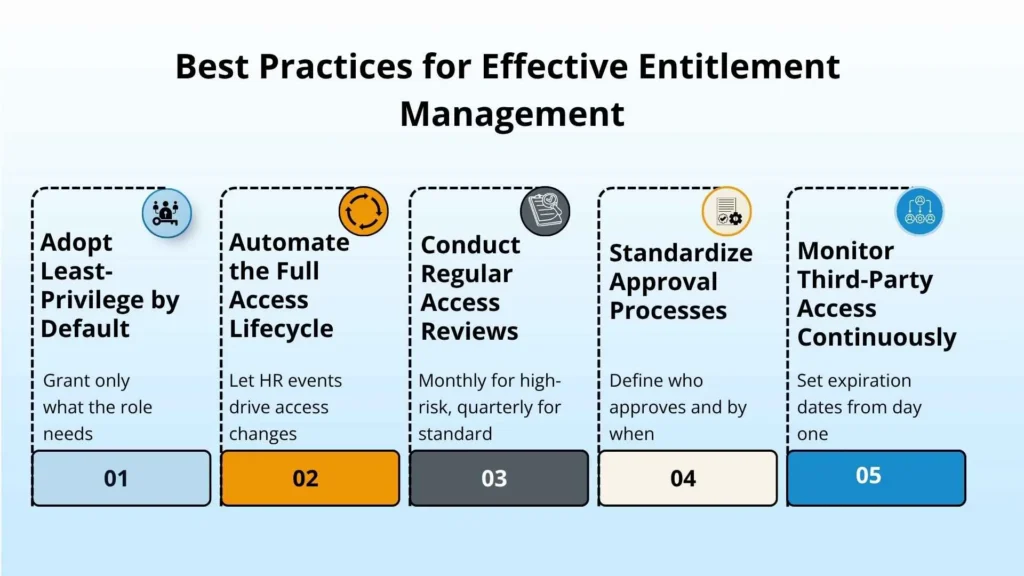
Knowing what entitlement management software should accomplish is one thing. Having a solution that provides that capability without the need for implementation processes taking months and requiring multiple consultants is something else entirely.
This is exactly where RoboMQ’s Hire2Retire solution shines. This solution is a Human Resources-focused identity lifecycle automation solution that integrates your HR system directly into your identity ecosystem of Active Directory, Entra ID, Okta, and Google Workspace. The capabilities this solution provides include:
Hire2Retire automatically provides the appropriate access for each new hire according to their job profile, department, and location, even before their first day at work. There is no need to create IT tickets or coordinate with IT. Employees are granted only those permissions they require while they start working without any hindrances.
When an employee changes his/her role or transfers to another department, Hire2Retire recognizes the change in circumstances and immediately adjusts their access rights. All the permissions related to the old role are stripped off, while new permissions corresponding to the present role are assigned.
Upon departure from the company, Hire2Retire blocks the employee’s access to the system on the final working day. Group membership is taken away. Access to applications is stripped from the individual. Active sessions are terminated. A critical problem that organizations face when it comes to insider threats is giving employees too much time between leaving the organization and losing active access credentials. Hire2Retire offers timed offboarding in various time zones.
For organizations conducting periodic access certification initiatives, the Application Access Review functionality offered by Hire2Retire extends their governance into business applications. When access is denied during a review process, Hire2Retire automatically takes away such access, without needing any further action from its side. Automated notifications are sent out to the owners and reviewers of such a campaign.
With the help of Workforce360 functionality, a consolidated view of identity, HR, and privilege information can be seen through an intuitive interface with over 50+ filters. By using this function, governance and security teams can have an accurate, real-time overview of each user’s access.
Hire2Retire is compatible with over 26 HRIS systems such as Workday, SAP SuccessFactors, ADP, UKG Pro, Paycor, and Oracle HCM. The platform interfaces with over 200 systems via SCIM connectors and works well with leading identity providers. Companies that use Hire2Retire have reported a 60% decrease in time for onboarding, 40-70% decrease in access-related issues, and audit compliance improvements.
User access issues won’t solve themselves. The longer you wait to resolve them, the more user access will build up, creating more risk, which makes resolving the problem harder. Entitlement management solutions provide automation and insight that manual efforts just cannot achieve.
Businesses that consider access governance to be an ongoing process rather than periodic maintenance find themselves enjoying less frequent security breaches, easier auditing, and better compliance results. If you are ready to take control of user access in your organization, RoboMQ’s Hire2Retire is built to help. Book a demo with our experts today.
IAM controls which systems users can have access to. Entitlement management solutions control what level of access each user is entitled to, covering request, authorization, assignment, review, and removal. IAM is the architecture, while entitlement management is one of the layers that form IAM.
Entitlement management systems automate access throughout the entire lifecycle. They package up permissions according to role-based access control packages, approve requests through mandatory workflow, provide limited-time access, and revoke access when it expires without any IT involvement.
It provides a detailed history of all decisions on access rights – who made the request for access, who authorized the request, when access was provided, and when it was revoked. Compliance with SOX, HIPAA, GDPR, and PCI-DSS becomes provable on demand instead of scrambling during an audit.
Entitlement management manages access for everyone – employees, contractors, and vendors. PAM protects privileged administrative accounts, which have top-tier access to the system. Entitlement management and PAM both have important roles to play, but they serve different purposes within the access control hierarchy.
Hire2Retire links your HR application with your identity management system and relies on dynamic workforce information to determine access permissions. Whenever an individual is hired, reassigned, or terminated, entitlements are instantly adjusted according to RBAC criteria – no intervention from IT is needed. Access is always consistent with the employee’s latest position, not their prior ones.

Read More about How to Automate HR Processes and enhance your business strategy.