Modern organizations operate in a dynamic environment. Employees frequently join, change roles, and leave, while access to systems and sensitive resources often lingers longer than it should. Industry data consistently shows over 50% of enterprise permissions are unused or unrequired, which increases the risk of overexposure and manual access reviews can take weeks or months.
The new feature in Hire2Retire, Access Certification address this challenge by providing a structured, repeatable way of periodically reviewing and validating user access rights, ensuring every permission remains current.
Access Certification is the process of reviewing and validating access rights of users in organizations withing a defined review period. The objective is to analyze user access by Reviewers and confirm whether access should be retained, revoked, or remediated based on the current job responsibilities of the user.
Access Certifications in Hire2Retire enables customers to –
With Access certification, Hire2Retire supports Group audit, where employee memberships in one or more groups are reviewed. The data source of certification is Workforce360.
In Hire2Retire, organizations can organize every access certification review with a campaign. The key fields of this campaign include:
a). Not started – Before start date
b). In review – After start date and before due date
c). Completed– All review items are completed
d). Past due – The campaign is incomplete post due date
A campaign is considered “Completed” only when all items are approved or rejected items are marked as fixed.
To ensure reviews are secure and compliant, Hire2Retire enforces clear role-based access. The different account-level roles are Admins, Editors, Reviewers, and Users. Admins will have full visibility and control across all campaigns. Editors can create and manage campaigns. Where Reviewers can only review assigned items, users will have no access to certification workflows.
On the campaign level, owners can view and act on all review items within their campaigns. Reviewers, on the other hand, can only see campaigns and teams assigned to them ensuring separation of duties while maintaining control.
By following a clear step by step campaign lifecycle, organizations can set up access certifications:
An Admin or a campaign owner can create a group audit campaign from the Access certification homepage by clicking on the “Create New Campaign” button. The screen then asks for basic details such as Campaign Name, Campaign description, Campaign start date, and Campaign due date. The campaign owner will then have to select the Identity system connection (Active Directory, Entra ID, or Hybrid).
Now, define the scope of the campaign by selecting one or more groups (Security Groups, Distribution Lists, Microsoft 365 Groups, Mail-enabled Security Groups).
Assign owners and reviewers. By default, the Campaign creator is the campaign owner. You can define named users as reviewers or can also assign a Manager as a reviewer or Group owner as a reviewer.
Once the campaign is created, Hire2Retire starts generating a snapshot of group membership data.
On the start date, the campaign status automatically changes to In Review.
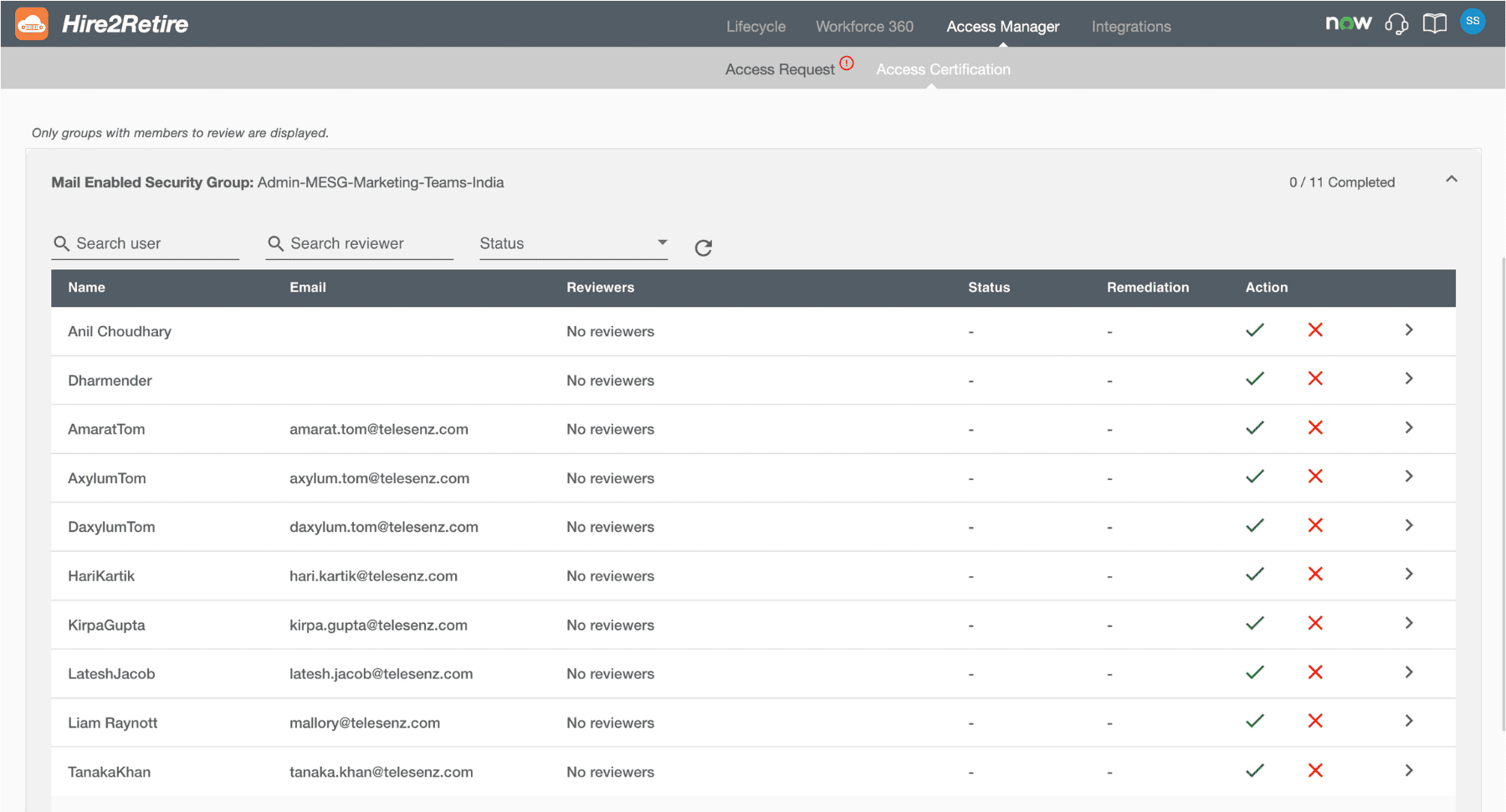
At this stage, all the reviewers are notified via emails about the campaign, and the review campaign becomes actionable. Each group appears with its current members listed as individual review items.
Reviewers can access the campaigns and items assigned to them. For each review item, they can :
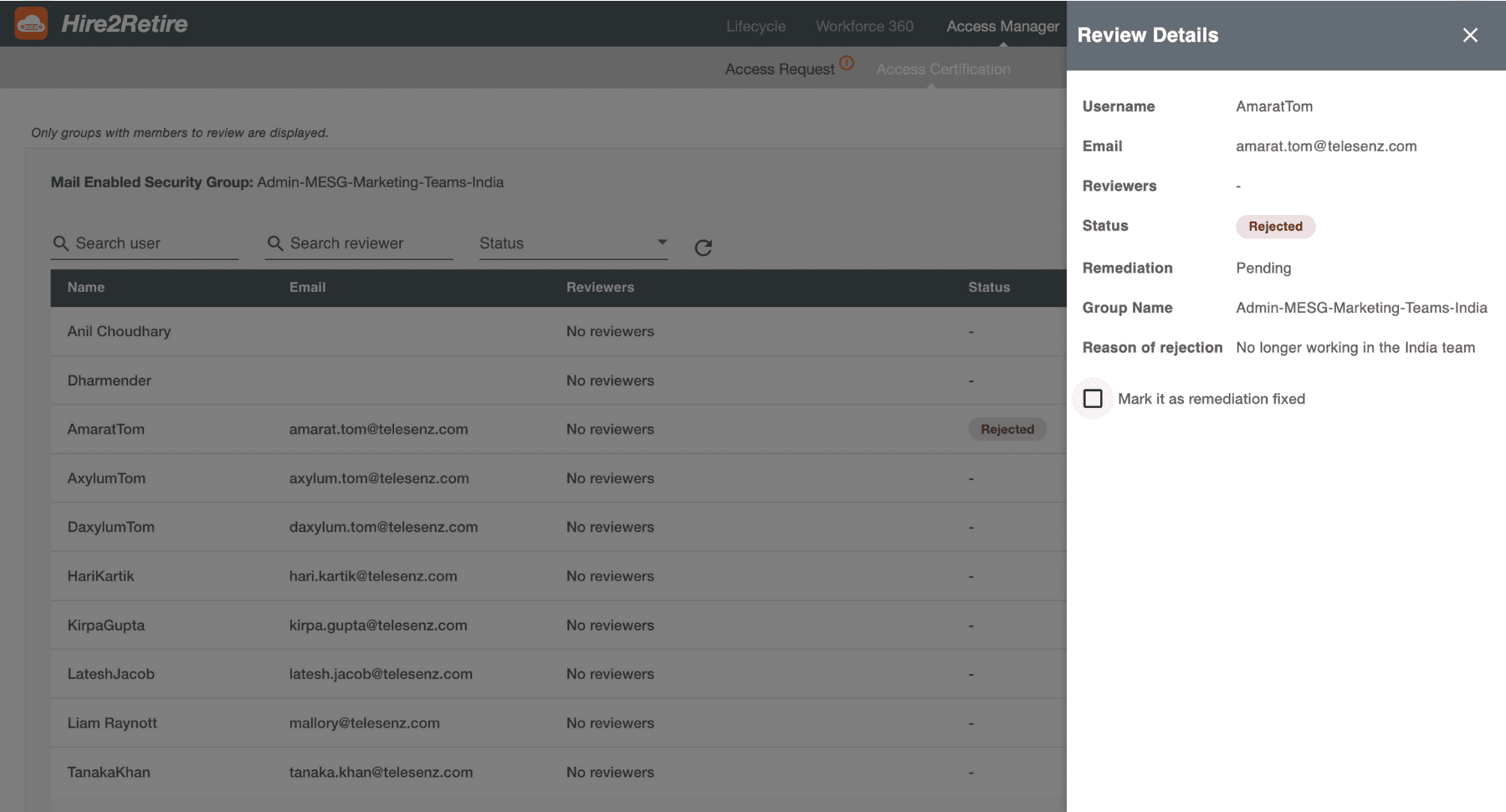
The rejected items will require follow up remediation. When an item is rejected, it is marked as Pending remediation.
Once the corrective action is done by owners or responsible teams, the item can be mark as Fixed in Hire2Retire.
A campaign is marked Complete only when all items are approved and rejected items are marked as Fixed.
In case some of the items remain unresolved after due date, the campaign status changes to Past due. After the due date, the campaign gets locked and no further approve, reject, or fix actions are allowed.
In organizations, group-based access being clustered carries the highest risk. Without regular reviews, excessive permissions can accumulate unnoticed.
With Access Certification, organizations can:
Everything while aligning access governance with broader Hire2Retire identity lifecycle.
Organization Access review should not be taken as a once in a year checkbox exercise. With Hire2Retire’s Access Certification campaign, organizations can streamline access governance easily.
Have more questions?
Book a discovery call with a Hire2Retire integration specialist today.
Need to dive even deeper into the Phase 10.1 changes? See every change made in the Hire2Retire Phase 10.1 release notes.
Somya Shrimal is a Marketing Specialist at RoboMQ. She is a tech enthusiast and a prolific blogger who helps businesses stay up-to-date with the latest trends and best practices in the industry. Her expertise in SaaS, cloud, on-premises apps, and IoT has made her a go-to source for businesses looking to navigate the ever-changing tech landscape.