Rippling HR automation features that power end-to-end automation across the employee lifecycle.
HR automation is often introduced to eliminate manual work, but most organizations continue to experience delays, fragmented workflows, and data inconsistencies even after adopting modern tools. The challenge is not the lack of automation features but the way workflows operate across multiple systems that do not always stay in sync.
When an employee joins or changes roles, several processes are triggered at once, including onboarding, payroll updates, and access provisioning. If any of these steps depend on delayed data or disconnected systems, the entire workflow slows down and requires manual intervention. This is where workflow efficiency becomes more important than automation itself.
Rippling approaches this challenge by combining HR, IT, and finance into a unified platform where employee data drives automated workflows. While this model offers clear advantages, the real impact of these rippling hr automation features depends on how they perform in practical, multi-system environments.
Workflow efficiency in HR is not defined by how many tasks are automated, but by how consistently processes move without interruptions. Automating isolated steps can reduce effort, but it does not ensure that workflows will execute smoothly from start to finish.
In most organizations, HR processes depend on coordination between systems such as payroll platforms, identity providers, and business applications. If these systems do not exchange data reliably, automation becomes partial and requires manual corrections at critical points. This is why efficient workflows depend on both automation logic and system alignment.
To understand how automation improves real workflows, it is important to focus on where it delivers the most operational value.
These improvements are most visible when workflows are clearly defined and supported by accurate data across systems.
Rippling workflow automation engine allows organizations to design multi-step processes triggered by employee lifecycle events such as hiring, promotions, or exits. This reduces dependency on manual follow-ups and ensures that routine actions are executed consistently.
From an operational perspective, this feature helps teams scale processes without increasing coordination effort. However, as workflows expand across systems, it becomes important to map dependencies carefully because gaps in integrations can disrupt execution even when automation is configured correctly.
Rippling connects onboarding steps across HR, IT, and payroll into a single workflow, which reduces delays caused by siloed operations. This approach improves the onboarding experience by ensuring that multiple tasks are initiated together rather than sequentially.
Organizations benefit from faster onboarding cycles and more consistent employee setup. At the same time, onboarding often involves external tools that may not always synchronize in real time, which can create gaps in areas such as access provisioning or document processing.
Automated access provisioning enables employees to receive applications and permissions based on their roles without requiring manual IT intervention. This improves productivity and ensures that employees are equipped to start work without delays.
In practice, access management becomes more complex when employees change roles or leave the organization. If connected systems are not fully aligned, updates to permissions may lag behind actual changes, which can impact both efficiency and security. This is a gap that Hire2Retire is specifically built to close, extending Rippling’s lifecycle events into Active Directory, Microsoft Entra ID, Google Workspace, and Okta to ensure provisioning and deprovisioning happen without manual intervention.
Payroll automation simplifies compensation workflows by connecting employee data directly with payroll processing. This reduces manual calculations and improves accuracy in tax handling and salary disbursement.
The effectiveness of this feature depends on the quality of upstream data. If employee records are not updated correctly or on time, these issues can affect payroll outcomes, making data consistency a critical factor in maintaining efficiency.
A centralized employee data model allows Rippling to act as a single source of truth for HR, IT, and finance workflows. This reduces duplication and ensures that updates are reflected across connected processes.
While this approach works well within the platform, most organizations rely on additional systems. Maintaining data consistency across these systems requires strong integration strategies, without which discrepancies can affect workflow reliability.
Rippling manages HR, payroll, and IT operations within its platform. Hire2Retire extends those events into identity and access systems, ensuring the full employee lifecycle is covered without gaps or manual intervention.
| Lifecycle Stage | What Rippling Handles | Where the Gap Appears | How Hire2Retire Extends It |
|---|---|---|---|
| Joiner | Onboarding workflows, payroll enrollment, and app provisioning within Rippling | Access to AD, Microsoft Entra ID, Okta, and Google Workspace is not automatically provisioned | Syncs new hire data from Rippling to identity providers and provisions role-based access on day one |
| Mover | Role and department updates within Rippling | Permission changes may not reflect across external identity systems in real time | Detects role change events in Rippling and updates access rights across all connected identity providers automatically |
| Leaver | Offboarding initiated within Rippling | Deprovisioning is limited to Rippling-connected apps, leaving identity accounts active | Triggers immediate deprovisioning across AD, Entra ID, Okta, and Google Workspace upon termination |
Together, Rippling and Hire2Retire cover the full scope of employee lifecycle automation, from HR data and payroll to identity governance and access management.
The Lucile Packard Foundation for Children’s Health is a strong example of using Rippling HR automation features to streamline operations. It faced challenges that are common in organizations managing growing HR operations. Manual handling of employee data and lifecycle processes created inefficiencies that reduced the time available for strategic work.
By introducing automation across HR and IT workflows, the organization was able to streamline employee profile management and reduce the effort required for routine administrative tasks. This shift allowed teams to focus more on their core mission rather than operational overhead.
This example highlights a common pattern in growing organizations. While Rippling helps centralize workflows, maintaining consistency across systems requires deeper integration. Hire2Retire connects HR events with identity and access systems, ensuring that onboarding, role changes, and offboarding workflows continue without gaps.
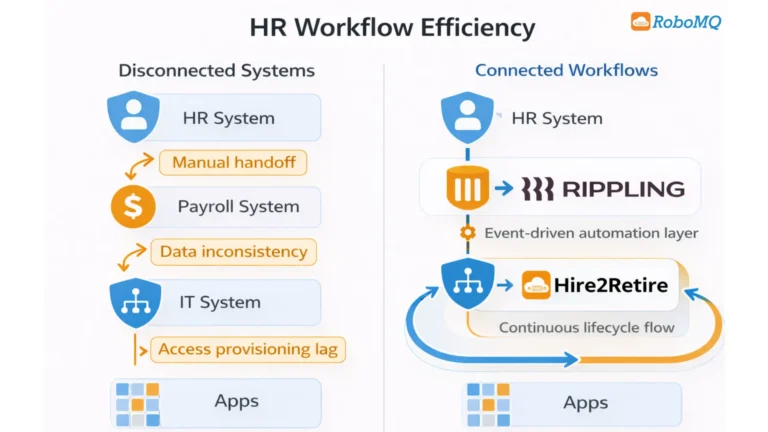
Even with advanced features, rippling workflow automation efficiency often depends on how well systems interact beyond a single platform. Most challenges arise when processes extend across multiple tools and require consistent data synchronization. According to research by the Ponemon Institute, 67 percent of organizations have experienced data breaches due to negligent access management processes, underscoring that automation gaps are not just an efficiency problem but a security risk. However, these results only happen when workflows are properly connected across systems and do not rely on disconnected steps or manual handoffs.
Common areas where workflows slow down include:
These challenges highlight that automation within a platform is only one part of the equation. True efficiency requires workflows to function reliably across the entire system landscape.
Hire2Retire addresses this by connecting Rippling’s employee lifecycle events directly with identity providers like Active Directory, Microsoft Entra ID, Google Workspace, and Okta. Role changes, onboarding, and terminations trigger automated updates across these systems without manual handoffs, keeping HR and IT in sync even when workflows cross platform boundaries.
Rippling hr automation features can improve workflow efficiency, particularly for organizations looking to unify HR and IT operations. Its ability to connect employee data with automation workflows creates a solid foundation for reducing manual effort.
However, achieving consistent efficiency depends on how well workflows extend across external systems and handle real-world complexity. Organizations evaluating automation should focus on how hr automation platforms perform in practical scenarios. Hire2Retire helps maintain continuity by connecting HR-driven events with downstream systems and ensuring workflows remain consistent across environments.
Rippling includes features like onboarding automation, payroll management, workflow automation, and app provisioning. These help reduce manual work and improve how HR tasks are handled.
Rippling improves efficiency by connecting HR processes in one system. This reduces delays, avoids duplicate work, and ensures tasks move smoothly from one step to another.
Rippling can handle complex workflows with automation and integrations. However, the efficiency depends on how well it connects with other systems used by the organization.
Most HR automation platforms, including Rippling, can face issues when workflows depend on multiple systems. Delays, manual approvals, and data mismatches can still affect efficiency.
Rippling provides a broad HR and IT platform for managing employee data and processes. Hire2Retire focuses more on automating employee lifecycle workflows, especially access provisioning and system integration.

Read More “How To” Articles