Is your organization's biggest security risk hiding between HR and IT?
Almost every company spends a lot of money on cybersecurity, which includes building a firewall, detecting threats, and protecting endpoints. However, there is another source of data breach incidents that is less well-known. This issue lies within the company itself. This includes orphaned accounts that have never been disabled or employees who still have access that they no longer require.
This is the identity gap, something that exists in most organizations where HR and IT systems operate separately. Workforce identity management is a strategy that solves this problem. This guide explains how identity gaps form and how workforce identity management, with Hire2Retire, helps unify HR and IT to ensure the right access at the right time.
Workforce identity management is the architecture that relates employee identity data to access provisioning, governance, and automation. It is the solution to three crucial queries that an organization must be able to answer:
Traditional IAM is designed to secure infrastructure – usernames and passwords for authentication purposes. Workforce identity management (WIM), on the other hand, is people-centric; it relates to employees, contractors, and partners.
All that WIM seeks to accomplish is to ensure that the right people gain the correct access rights in the right way at the right time – and revoke these access rights once there is no need for them anymore.
To solve any problem, the first step is always to identify it. The reason that gaps in identity occur is due to the interaction of two incompatible infrastructures.
Human Resources infrastructure manages the identity of employees and knows all of the details, such as the date of hiring, the title of the employee, his/her department, and the date of termination of employment.
IT infrastructure manages access and knows the applications to which an employee is granted access. However, this information is known by IT only if informed by HR. Moreover, HR is not always informed accurately and promptly enough to keep everything in sync.Here are some possible scenarios for identity gaps to appear:
All these examples show the practical side of why identity gaps occur.
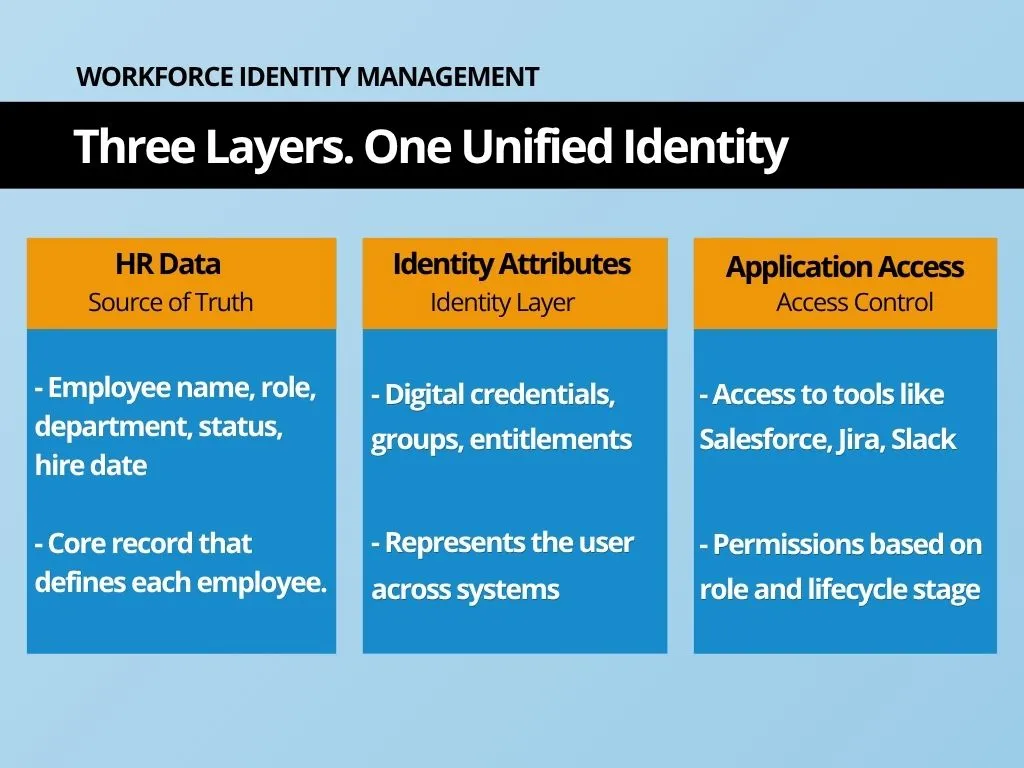
Workforce identity lifecycle management ensures that access rights remain accurate as employees navigate through the various stages of their time within your organization. Everyone will pass through three steps, and each step presents an opportunity for error.
During the initial stages of a new hire joining your company, a delay in provisioning leaves your new employee spending valuable time without access and unable to do any productive work. Your IT team struggles to provision access manually. First impressions have already been marred long before the new hire gets down to business.
Access starts to become a big problem during the role change stage. Whenever someone moves roles, the access they had previously continues to remain active while additional access is provisioned. None of the unnecessary access is removed. Thus, after some time, the employee ends up having access to much more than they should.
Offboarding poses one of the biggest risks of all. Here, delayed offboarding results in active accounts being left in the possession of employees who have stopped working at your company. This tends to be among the most common reasons for data breaches, but it is easily avoidable if you automate workforce identity lifecycle management.
The problem here isn’t one of poor management. It’s a systems problem. When your HR department and IT department aren’t synced, everything becomes manual.
Workforce identity management needs something beyond a policy. It requires a platform tailored to deal with today’s workforce issues. Hire2Retire integrates HR & IT processes, removes all manual dependencies, and provides full control over access to workforces for decision-makers. Here are Hire2Retire solutions to solve every issue mentioned above.
By using Hire2Retire’s Workforce 360 solution, companies can obtain a consolidated view of every employee, containing HR profiles, identity data, groups he belongs to, and permissions he has. It will show discrepancies between HR information and access provisions provided by IT. One platform. One source of truth.
Each application will be shown as an access layer with its information about who accesses it, their current status, and the date of access creation. This way, your team will get detailed information per application without the necessity of logging into each of them.
With the metadata filtering feature, your team can query access data based on such criteria as role, status, application, and other attributes. Searching among your employees who have administrative permissions in Salesforce or Jira now takes seconds rather than hours.
Hire2Retire tracks and times all access-related actions, including changes of role, grants, and revocations. All access changes are automatically logged, so you always have access history ready at all times and don’t need to spend extra time preparing yourself for audits.
Real-time monitoring of each integrated application is provided by Hire2Retire. Such monitoring includes data on current active users, total membership, application owner, and synchronization status. Thus, you know which application is underutilized and mismanaged.
Access data is gathered right away from source applications. In case an employee’s information has changed in the HR module, the provisioning/deprovisioning process runs automatically, so all access information stays accurate.
The business impact of effective workforce identity management is immediate and measurable.
Identity gaps do not appear overnight; they grow every time HR and IT fall out of sync. The longer the identity gap is left without attention, the higher the danger for your security, compliance, and efficiency. With the help of workforce identity management, your company gains access to tools to prevent potential threats from becoming major issues. If you are ready to make your next move, then book a demo with our experts today.
Industries that have high regulations, such as financial services, healthcare, and software-as-a-service businesses, benefit the most from it; however, other organizations that use multiple applications and a decentralized workforce can also suffer from identity gaps.
With workforce identity management, proper access is granted instantly so that employees can get started right away rather than wait for IT requests and manual configurations.
No. Medium-sized enterprises encounter identical problems with identity gaps regardless of their size. The more software-as-a-service (SaaS) solutions companies integrate, the greater the risk of identity issues becomes.
With continuous monitoring and tracking of access changes, it becomes much easier to notice suspicious activity in the network.
Provisioning, orphan account number, access review coverage rate, offboarding process duration, and audit compliance violations must be considered.

Read More about How to Automate HR Processes and enhance your business strategy.