Jen works as an IT administrator at a multi national company. Her company is planning for mass expansion, meaning hiring at large scale in different departments. “group creation”.
In the current setup of her company, every new department needed a corresponding security group to manage access. For instance, ‘Finance – Security Group’ or ‘Marketing – Security Group’. This naming convention allowed Jen’s team to keep things organized and secure. However, there was one small setback, it required a manual setup for each new team. Furthermore, to manage numerous groups, they needed to switch between Identity and Access Management (IAM) applications and platforms to create and manage groups, resulting in poor experience with usability.
According to Gartner’s 2024 IAM Market Guide, enterprises that automate group creation and user provisioning manage to reduce administrative overhead by 40% and save over 2000+ IT hours annually.
For Jen, these stats weren’t just numbers. They showed time saved, risks mitigated, and compliance made easier. If you are also struggling like Jen, we have a great news for you.
With 8.5 feature release, Hire2Retire enables users to create and manage groups directly within H2R during design time using regex. This allows them to eliminate the need for external group management in IAM applications. It also allows them to focus on group membership management within Hire2Retire instead of navigating between IdPs and Hire2Retire to create groups.
What is the Business Value of this Feature?
This feature adds additional value to Hire2Retire as it enables group creation for IdPs including AD, Entra ID, Okta Directory and Google Workspace. Furthermore, it allows the following:
Group Creation at Design Time – Users can now create groups directly within their Hire2Retire workflow. This functionality is especially useful when a customer needs to manage a group that doesn’t currently exist in their Identity Provider (IdP).
Automating group creation eliminates repetitive manual tasks, enabling IT teams to handle growth effortlessly. Furthermore, it also enables organizations to improve security and compliance while enhancing the employee experience.
How to enable it on Hire2Retire?
1.
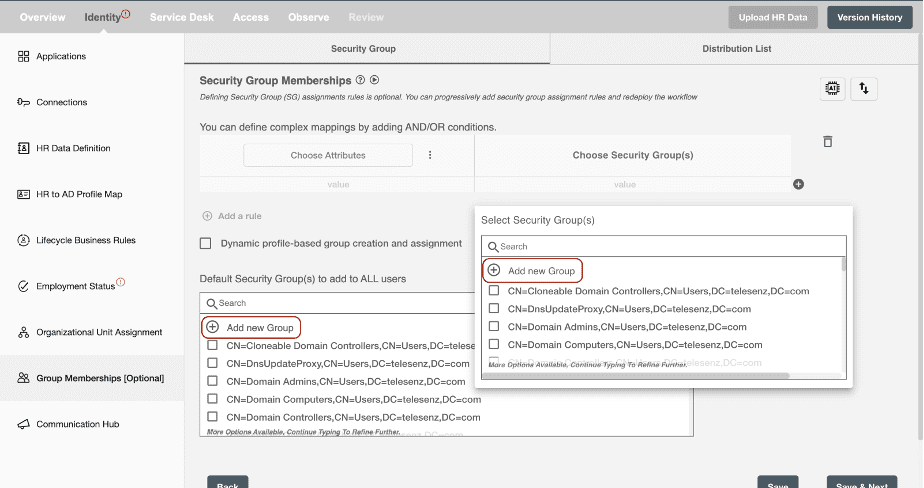
Users can add a new group from the Hire2Retire group membership page using the “Add new group” button provided at the top of multi-select dropdown in Group membership step.
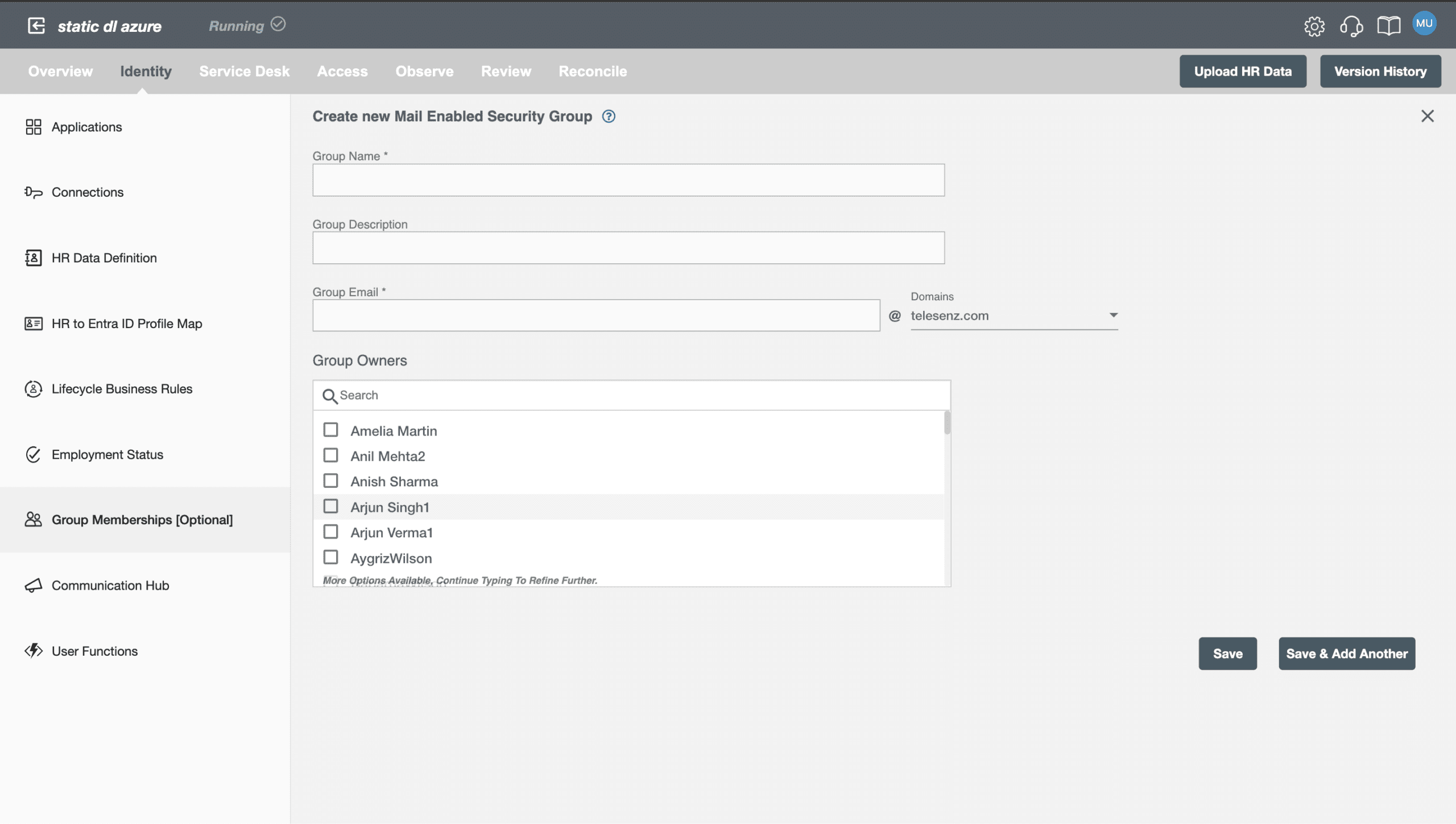
2. Upon clicking “Add new group”, the form will open. Form contains the necessary attributes for creating a group, such as Group Name, Group Type, Group Owners, Organizational unit ,etc.
3. Upon filling in all the necessary information in the form, the user can save the form. Clicking the “Save” button, UI will call the PIP backend API to create the group where the group will be created on the respective IdP. The created group will be shown as selected in the multiselect dropdown. If the user clicks on the “Save and Add another” button, the group will be created and the form will be cleared so that the user can create another group.
It empowers HR and IT teams, supports compliance, and aligns access control with organizational changes, delivering faster, more reliable, and cost-effective group management.
Want to learn more?