Summary: An employee termination checklist is a structured set of steps HR and IT teams follow when an employee leaves, covering access revocation, device retrieval, account deactivation, and compliance documentation. Without automation, even a thorough checklist for terminating an employee, leaves gaps. Hire2Retire eliminates those gaps by automating every step the moment a termination is recorded in your HR system.
Every organization grants temporary access constantly. A contractor for a three-month engagement, an employee for a single project, a vendor for a system migration. Granting that access is rarely the problem. The problem is what happens after the engagement ends and nobody removes it.
That gap has a real business cost. Standing access that outlives its purpose is one of the most common findings in security audits, and it’s a direct contributor to breach exposure. Every unused credential still active in your systems is an entry point an attacker doesn’t need to work hard to find. It also drains IT capacity: teams spend hours each month manually tracking who still has access to what, instead of focusing on higher-value work. And when compliance frameworks like SOC 2 or ISO 27001 ask you to prove that access is reviewed and revoked on schedule, “we usually remember” is not an answer that holds up.
The root cause isn’t that organizations grant too much access; it’s that revoking it depends on someone remembering to act, and memory doesn’t scale. Time-based access control removes that dependency by making expiration part of the access itself, not a follow-up task. Before looking at how it delivers that, it helps to start with what time-based access control is.
Time- based access control is a security approach that ties access rights to a defined time rather than granting them indefinitely. Traditional access control answers one question: who can access what. Time-based access control adds a second question that’s just as important, i.e., for how long. A simple way to frame it:
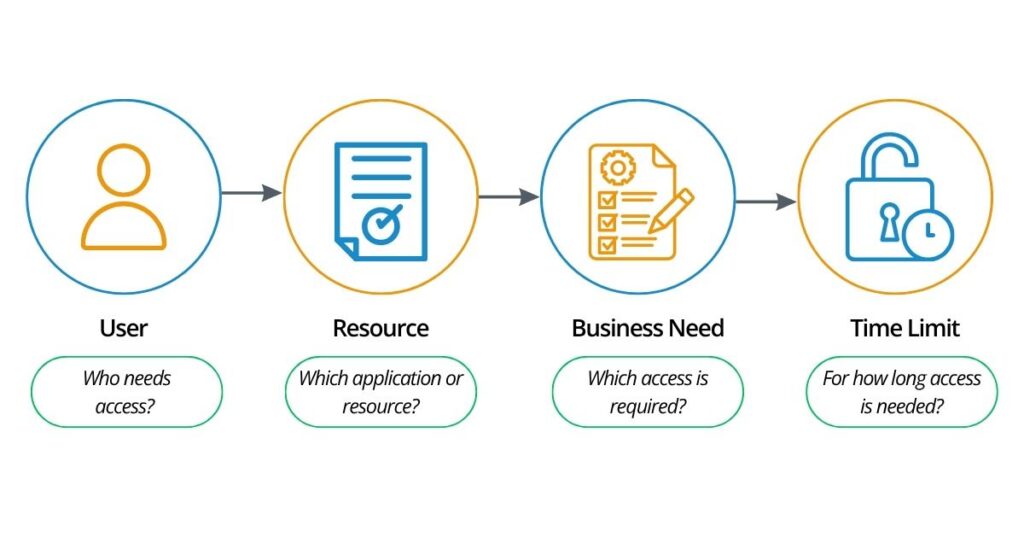
It’s worth distinguishing time-based access control from Role-Based Access Control (RBAC) , since the two are often confused but solve different problems. RBAC determines what a person can access based on their role in the organization. Time-based access control determines how long that access, whether role-based or granted for a one-off need, should remain valid. Neither replaces the other. In a mature access governance program, they work side by side: RBAC defines the boundaries of access, and time-based access control defines its lifespan.
That distinction matters most once access moves from a policy on paper into something running in production systems. So, the next question is practical: how does time-based access control operate, end to end?
The lifecycle of time-based access control follows a simple flow:
Request → Approval → Provision → Active Access → Expiration → Revocation
What makes time-based access control different is that access has an end date from the beginning. When access is granted, its expiration is defined as part of the policy. This means organizations don’t have to rely on someone remembering to remove access later. When the defined period ends, access can be automatically revoked.
The result is less lingering access, fewer manual tasks, and better control over temporary permissions. This is especially valuable for contractors, temporary employees, project teams, and anyone who only needs access for a limited period. In short, time-based access control answers two questions at the same time: Who should have access, and how long should they have it?
The value of time-based access control isn’t primarily technical; it’s operational and financial. Left unmanaged, standing access accumulates in ways that quietly increase cost and risk over time. Time-based access control helps organizations reduce:
The underlying principle behind all of this is simple to state and hard to enforce manually: if the business need has an end date, the access should have one too. Time-based access control is what turns that principle from a policy statement into something that’s enforced.
With that business case established, it’s worth grounding the concept in where it shows up most often in day-to-day enterprise operations because time-based access control isn’t a theoretical control. It maps directly onto situations most IT and security teams deal with every week.
Time-based access control is most valuable when access is temporary by design. Instead of relying on people to remember when access should end, organizations can set an end date upfront and let access expire automatically.
Contractors and vendors often need access only for the duration of a project or contract. Time-based access control ties their access to the contract end date, reducing the risk of orphaned accounts and unnecessary access after the engagement ends.
Employees may need additional systems or resources while working on a specific project. Time-based access control automatically removes that access when the project ends, helping prevent access creep and excessive permissions.
IT teams may need temporary administrative privileges to resolve an incident or perform maintenance. Time-based access control limits privileged access to a defined window, reducing security exposure from standing administrative access.
Some employees need specialized applications only for specific tasks or business cycles. Access can be granted for the required period and automatically revoked afterward, reducing manual provisioning work and unused licenses.
Employees taking on temporary assignments, covering another role, or supporting a fixed-term initiative may need additional access for a defined period. Time-based access control ensures that access ends with the assignment, keeping permissions aligned with the employee’s current responsibilities. Across these scenarios, the business value is clear: give people the access they need, for exactly as long as they need it, and remove it automatically when they don’t. This makes time-based access control an important part of a broader identity governance strategy focused on least privilege, security, and operational efficiency.
Time-based access control is a natural extension of the least privilege principle, which is a widely recognized security standard stating that access should be restricted to the minimum necessary to perform a given task. Least privilege is usually discussed in terms of scope: making sure users only get the access they need. What often gets left out of that conversation is duration, making sure they don’t keep that access longer than necessary.
Put together, this gives a simple governing principle for access governance as a whole:
Right User + Right Access + Right Time
This is why time-based access control complements RBAC and other access governance controls rather than competing with them. RBAC defines the boundaries of who gets what. Time-based access control defines how long those boundaries should hold. Together, they close one of the most common and most overlooked gaps in enterprise access governance: access that was entirely correct when it was granted but should never have still been active six months later.
Understanding this connection is one thing. Enforcing it — consistently, across every contractor, every project, every elevated access request, without adding to IT’s workload — is a different challenge altogether. That’s where automation becomes necessary rather than optional.
Manually enforcing time-based access control at scale is difficult for the same reason manual offboarding fails; it depends on people remembering to act at exactly the right moment, across dozens or hundreds of open access grants at once. Hire2Retire removes that dependency by automating the entire Time-based access control workflow, from the initial access request through approval, provisioning, and automatic revocation, based on a defined duration or end date. The workflow looks like this:
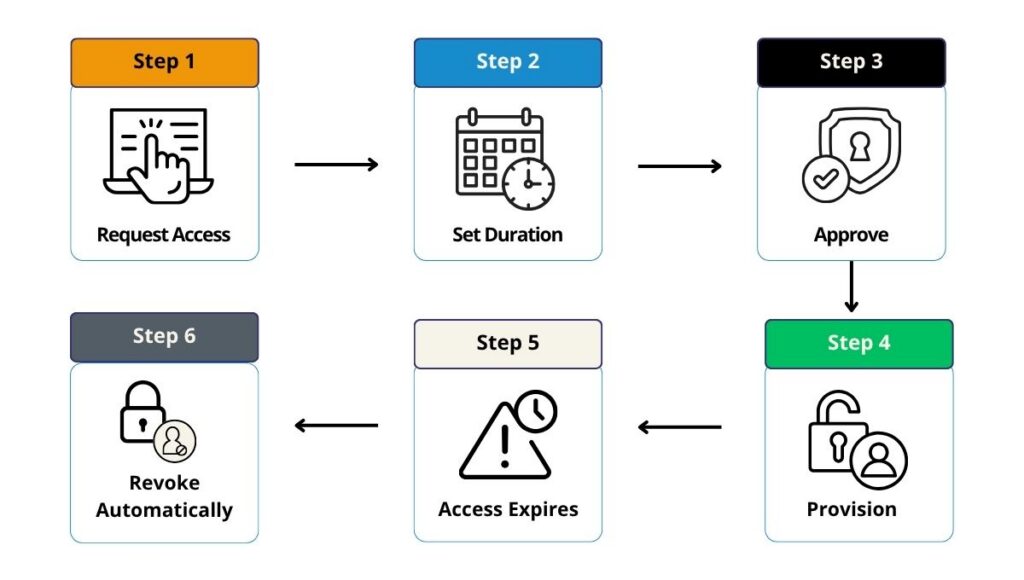
Once a duration is set at the point of request, Hire2Retire tracks it continuously and revokes access automatically the moment it expires. No follow-up ticket required, no manual checklist, and no dependency on any one person remembering to close the loop. This is what turns Time-based access control from a documented policy into a working, automated identity workflow.
Time-bound access doesn’t work on its own, though. A contractor’s access shouldn’t just expire. It needs to fit with everything else happening during that contractor’s time with the organization. That’s the next part we’ll look at.
Rather than treating Time-based access control as an isolated feature, it makes more sense — and holds up better operationally — when it’s connected to the broader employee lifecycle that Hire2Retire already automates. Access can be shaped by the full sequence of workforce events an employee or contractor moves through:
Joiner → Role Change → Temporary Assignment → Contractor End Date → Leaver
Because Hire2Retire uses HR data as the single source of truth, Time-based access control works alongside joiner-mover-leaver (JML) automation, RBAC, and HR-driven provisioning as one connected system — not a separate tool bolted on just to handle temporary access. A contractor’s end date, a project’s completion, or an role change all flow through the same automated identity engine.
With the mechanics and the lifecycle context in place, the last step is turning this into something an organization can roll out, which comes down to a handful of practical decisions made up front.
Before rolling out Time-based access control, organizations should clearly define a small set of ground rules:
Whenever a task, project, or contract has a known end date, access should expire automatically. This should be the default, not something someone has to set up manually each time.
Temporary access should never quietly become permanent exposure. Time-based access control gives organizations a practical, enforceable way to govern not just who gets access and what they can access, but how long they’re allowed to keep it.
For organizations still relying on manual tracking and institutional memory to close out temporary access, Time-based access control turns an easy-to-miss follow-up task into an automatic, policy-enforced outcome. Hire2Retire automates this across the entire identity lifecycle, strengthening least privilege, reducing manual work for IT teams, and closing one of the most overlooked gaps in enterprise access governance.