Summary: Group membership management is the process of assigning and maintaining user access to security groups, distribution lists, and organizational units within a directory environment. Hire2Retire simplifies this using AI Insights, a machine learning feature that analyzes existing Active Directory data and automatically generates optimized mapping rules. This reduces setup time and enforces consistent access governance across the employee lifecycle.
If you have ever been responsible for managing group memberships across a large Active Directory environment, you know how quickly it becomes unmanageable. Rules multiply. Exceptions stack up. Someone gets added to a group manually because a ticket came in faster than the policy could be updated. And before long, you have a directory full of memberships that nobody can fully account for. Group membership management sits at the core of how organizations control access.
Get it right, and every employee has exactly the access their role requires from Day 1. Get it wrong, and you spend months untangling inconsistent permissions, failed audits, and security gaps that were never visible until something went wrong. That’s where Hire2Retire comes in. With AI Insights, IT teams can simplify group membership management, reduce manual work, and keep access aligned as the organization grows.
Group membership management is the process of assigning users to the correct security groups, distribution lists, organizational units, and Microsoft 365 groups within a directory environment like Active Directory or Microsoft Entra ID.
It determines what resources an employee can access, what systems they can log into, and what communications they receive, all based on their role, department, location, and other attributes. In theory, group membership management should always reflect every employee’s current position in the organization. In practice, it rarely does.
The gap between what group memberships should look like and what they look like in most directories is where access risk accumulates. Let me tell you, manual processes, inconsistent rule definitions, and the sheer volume of changes that happen across a growing workforce all contribute to a group membership environment that drifts further from policy with every passing month.
Effective HR to Active Directory sync is the foundation of accurate group membership management but sync alone isn’t enough. The rules that govern which groups an employee belongs to need to be precise, policy-driven, and consistently applied every time an identity event occurs.
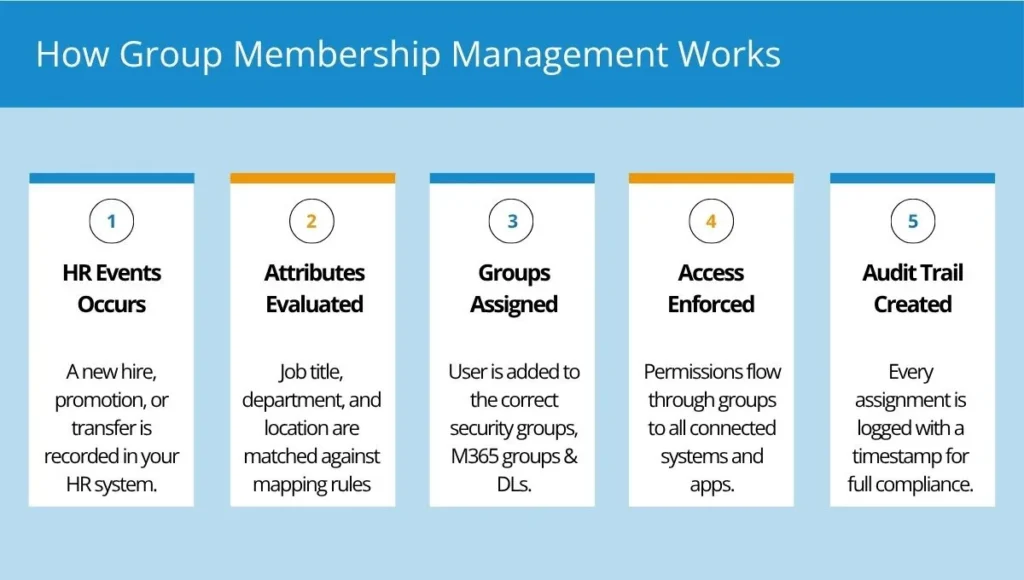
Most organizations have an easy process for managing user group memberships. IT provisions users to appropriate groups based on their department or job role. Rules are usually written down somewhere or handed down orally through whoever was responsible for directory services in the past. This works when the company is small. But as the organization grows, things get complicated.
Businesses evolve over time. New departments emerge, individuals acquire new duties, and applications come into use. However, group membership rules don’t necessarily follow. Updating the rules manually takes time and room for error. Thus, it’s common practice for members of different groups to include both current rules as well as outdated ones established a while ago.
As an employee evolves throughout his career, his duties change accordingly. He may be assigned more privileges or moved to another department. In most cases, this means acquiring additional permissions without relinquishing any of the privileges he had earlier. This creates an undesirable scenario where individuals hold unnecessary access rights.
To lighten the load of IT professionals, companies permit managers or leaders to assign group membership to their teams. Though this might sound practical and efficient, it may lead to various issues. Employees will get access to certain groups based on their convenience and not according to the company policy. It becomes harder to monitor the change process, since not all changes are documented, making it impossible to identify what changes were made and by whom.
Everything will look fine until an audit takes place. The auditor will require a justification for granting such access to employees and ensure that only necessary permissions have been given to employees, depending upon their responsibilities. When it comes to manual assignment of group membership, this process is rather tough since the permissions are granted at random intervals, and there is no way you can justify your actions during an audit.
Managing groups across Active Directory, Microsoft 365, Entra ID, and Google Workspace can quickly become a challenge as organizations grow. New teams need new groups, employees change roles, and access requirements constantly evolve. Keeping everything accurate manually is time-consuming and often leads to inconsistencies.
Hire2Retire by RoboMQ automates group membership management through HR-driven rules, ensuring employees are assigned to the right groups based on attributes such as department, location, job title, or manager. As employees move through the organization, group memberships are updated automatically without requiring manual intervention from IT.
With Hire2Retire, administrators can create security groups, Microsoft 365 groups, and other supported group types directly within the platform. There is no need to switch between multiple identity systems or manually create groups before configuring membership rules. This makes it easier to support organizational growth, onboard new departments, and maintain a consistent group structure across identity platforms.
Hire2Retire supports group membership management for:
Using a single rule engine, organizations can manage memberships consistently across all environments while reducing manual effort and administrative overhead.
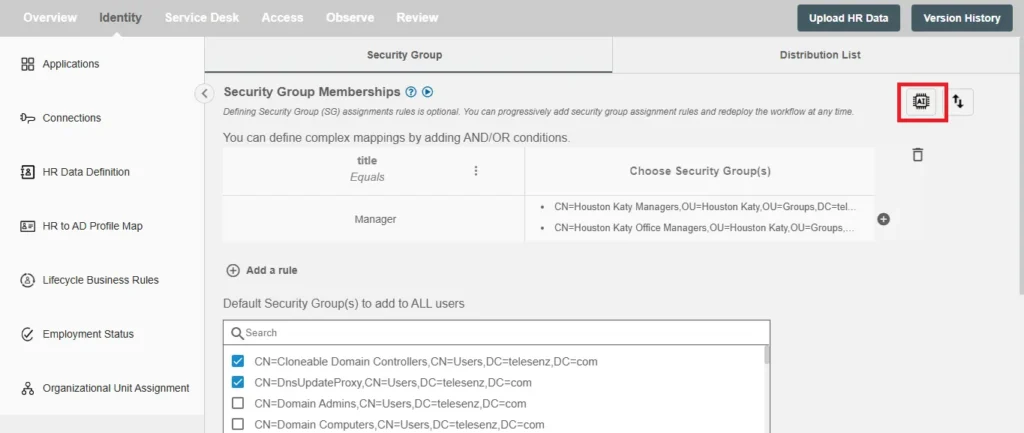
Creating group membership rules from scratch can be one of the most time-consuming parts of implementation. AI Insights accelerates the process by analyzing your existing directory structure and group memberships to generate recommended rule sets automatically. Along with the generated rules, organizations receive detailed insights explaining why each recommendation was made, making it easier to review, customize, and deploy group membership policies with confidence.
For organizations managing large numbers of groups and rules, Hire2Retire supports bulk import and export of mapping rules. This allows administrators to make changes at scale, migrate configurations between environments, and maintain governance more efficiently.
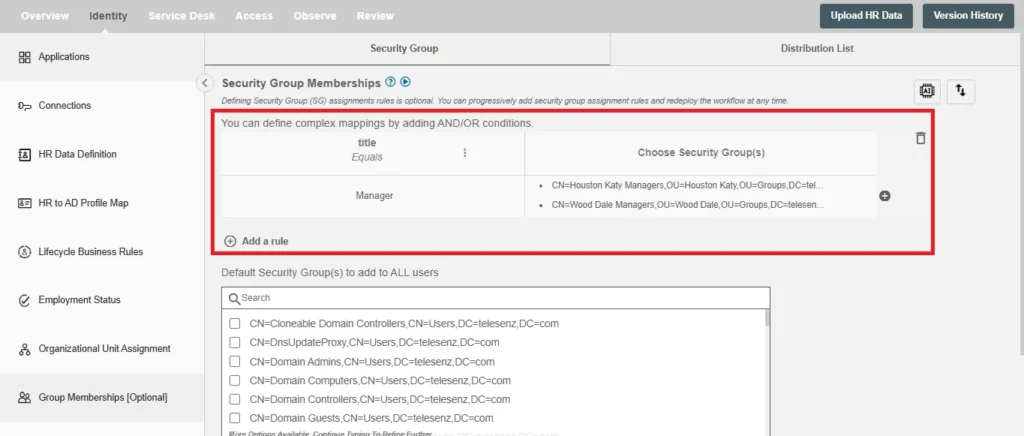
Hire2Retire automatically assigns employees to the right Security Groups, Distribution Lists, and Microsoft 365 Groups using HR-driven rules based on attributes such as department, location, job title, and business unit. As employee data changes, memberships are updated automatically, reducing manual administration and helping ensure accurate access.
Hire2Retire supports multi-domain environments and flexible rule logic using AND/OR conditions. This allows organizations to automate group assignments based on multiple HR attributes while maintaining consistency across complex enterprise environments.
By automating group creation, membership assignments, and organizational unit placement, Hire2Retire helps eliminate manual errors, reduce privilege creep, and maintain consistent access policies throughout the employee lifecycle. The result is a more secure, compliant, and scalable approach to group membership management that grows with your organization.
Proper handling of group membership does not only involve a one-time configuration effort; the process should be accurate at all times throughout the employee lifecycle, and Hire2Retire makes this possible in every step.
| Lifecycle Stage | Group Membership Management Action |
|---|---|
| New Hire | Groups assigned automatically on Day 1 based on role, department, and location attributes |
| Role Change / Transfer | Old group memberships removed, new ones assigned in real time based on updated HR data |
| Promotion | Group memberships updated to reflect new title and access requirements without manual IT input |
| Contractor / Temp | Time-bound group memberships assigned with automatic expiry at contract end |
| Termination | Group memberships removed immediately upon HR record update, closing access across all connected systems |
Group membership management may seem easy until your organization begins to grow. People change jobs, groups become different, and it gets harder to make changes manually. Hire2Retire helps you keep group membership data up to date without any extra work on your part. With HR-driven automation and AI recommendations, all you need is to trust Hire2Retire to provide the proper access. You will get improved security and minimized access-related problems. Curious about how we can help you with this problem? Contact us for a demo.
Security Groups are created to regulate application and file system access, while Distribution Lists are created for email distribution purposes. Accuracy of both group types is essential since it ensures that users get appropriate access rights or receive correct emails. The Hire2Retire software automates group membership management processes for Security Groups and Distribution Lists via straightforward workflows based on rules.
When managers manually update group memberships, changes often happen without documentation or oversight. Over time, this leads to inconsistent access and audit challenges. Hire2Retire automates group assignments based on HR data, ensuring every change is consistent, traceable, and compliant.
Once you provide us with the necessary information, our AI evaluates your directory data and provides you with appropriate group assignment rules. Then, you will get an automatically generated CSV file and a report that includes additional insights related to rules. The time required for this process may vary depending on the size and complexity of your infrastructure.
Yes, we support multiple domains and can automate group assignment processes independently of where your Active Directory structure is located.
Yes, Hire2Retire supports Microsoft Entra Groups in Microsoft Entra ID and Google Workspace Organizational Units.