A promotion, transfer, or role change should be accompanied by immediate access updates. In many organizations, however, these changes take days to complete. Old access remains active, required permissions are not granted on time, and gaps in security and compliance can emerge.
The solution is to automate employee role changes so that the moment HR records a transition, identity and access updates happen in real time, with no IT tickets, no manual steps, and no lag. This blog explains why this matters, what a complete automated workflow looks like, and how RoboMQ Hire2Retire delivers it.
In Identity Governance and Administration (IGA), the employee journey is described through three events: Joiner (onboarding), Mover (role change), and Leaver (offboarding). Together, these are called JML or the identity lifecycle management framework.
The Mover event covers any change to an employee’s status that requires identity or access updates-
Each of these changes should trigger precise, policy-driven updates to a user’s digital identity: group memberships, directory attributes, resource access, licenses, and org chart placement. In most organizations, this does not happen automatically. It happens through IT tickets, spreadsheet requests, or not at all.
According to the Gartner IGA Market Guide, Organizations with manual identity lifecycle processes experience an average of 2.5x more unauthorized access incidents than those using automated IGA tools.
When organizations rely on manual processes to manage role changes, the operational and security costs compound quickly.
On the operational side, IT admins spend one to three hours per change updating Active Directory, Azure AD (Entra ID), or Google Directory by hand. HR must email IT, wait for confirmation, and follow up on delays. By the time access is updated, the employee has already started the new role with the wrong permissions: either too much carried over from the old role, or too little to function in the new one.
The security and compliance costs are more serious. Privilege creep is the most common outcome: old group memberships and permissions from the previous role remain active, and over time employees accumulate access far beyond what their current job requires. This pattern is one of the most frequent findings in SOC 2, ISO 27001, and HIPAA audits. Beyond that, new role-specific systems often go unprovisioned entirely, leaving the employee unable to perform their job on day one in the new function. And without an automated event log, there is no reliable record of when access changed, what changed, or who authorized it, making audit responses reactive and incomplete.
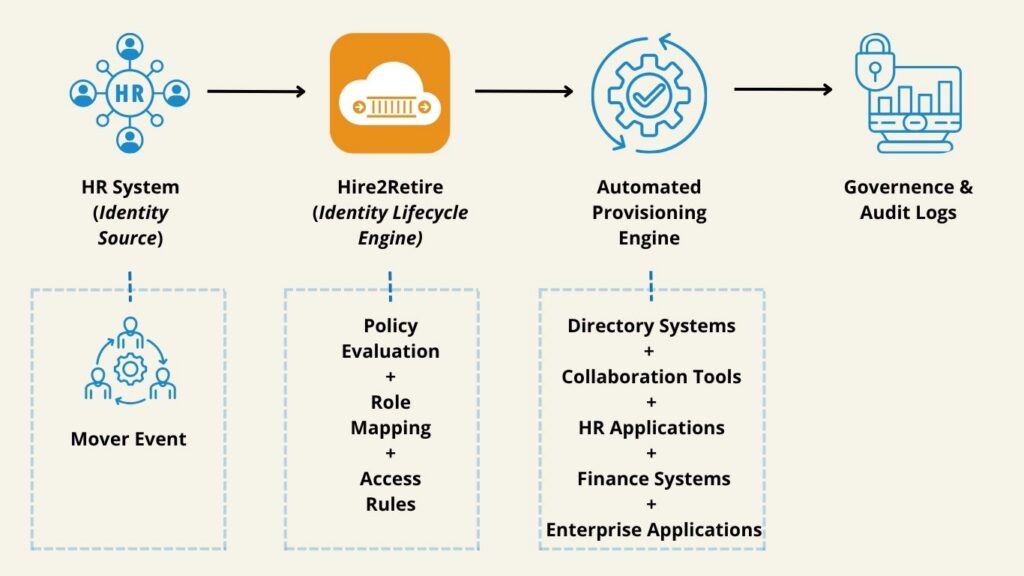
A well-designed automated role change workflow is triggered by a single source of truth: the HR system. The moment the HR team updates an employee record (title, department, cost center, manager, or location), the automation executes the full update sequence without any human intervention.
It begins with the HR admin recording the role change in the HCM platform (Workday, ADP, Oracle HCM, SAP SuccessFactors, or similar). The IGA platform detects that change in near real time and immediately updates the user’s profile in AD, Azure AD, or Google Directory, including display name, title, department, OU placement, manager field, and email attributes. At the same time, group memberships from the previous role are removed and licenses tied to the old function are de-provisioned, while new groups, security policies, and licenses aligned to the new role are applied based on RBAC policies. The Global Address List and organizational chart are updated to reflect the new reporting structure.
For any actions that fall outside automated provisioning, such as shipping a new device, assigning a new shared mailbox, or requesting physical access, a structured ITSM ticket is auto-generated in the connected service desk. The employee, their new manager, and HR receive automated email confirmations. Every step is timestamped and logged as an immutable audit entry.
This is what role changes through automation look like at enterprise scale: a single HR action produces a cascade of precise, policy-enforced identity updates, with a full audit trail, in minutes.
Organizations that implement role changes through automation see measurable outcomes across time, effort, risk, and productivity. Where manual processes take three to seven business days to provision new access and one to three IT admin hours per change, automated processing completes the same work in minutes with near-zero human effort.
Audit readiness shifts from labor-intensive log reconstruction to a real-time event trail. The security risk window, which can extend to weeks of stale access under manual handling, closes within the same processing cycle. And where employees in a new role often start with partial or delayed access, automation ensures full access is in place on day one.
Hire2Retire by RoboMQ positions this as 90% or more cost avoidance on identity provisioning tasks. For organizations managing hundreds of role changes per month, this translates into significant reduction in sysadmin overhead and measurable improvement in security posture.
Employee access management is not only about onboarding and offboarding. Role transitions carry their own distinct risk profile that many organizations underestimate.
The most common vulnerability: stale entitlements from prior roles. When an employee moves from a finance function to operations, their access to financial systems often persists. When a junior analyst is promoted to director, they retain read-only access alongside gaining administrative rights, creating a layered, unreviewed permission set.
This is how privilege creep becomes systemic. Each transition adds a layer without fully removing the previous one.
Effective employee access management at the role-change stage requires-
Without these controls, every role change becomes a potential compliance exposure.
Hire2Retire by RoboMQ is a purpose-built IGA platform that integrates HR systems with identity providers to automate the full JML lifecycle, including the Mover event.
Here is how Hire2Retire specifically handles a role change:
Source systems supported: Workday, ADP, Oracle HCM, SAP SuccessFactors, UKG Pro, Ceridian, BambooHR, Paylocity, HiBob, Paychex, iSolved, Personio, Rippling, and 20+ more HCM platforms
Identity targets supported: Active Directory, Microsoft Entra ID (Azure AD), Google Workspace, Okta Directory, and hybrid environments
What Hire2Retire does when a Mover event is detected-
Key differentiators-
Hire2Retire is configured through a no-code UI rather than custom scripting. The logic structure resembles Excel formula patterns, which reduces implementation time and removes the dependency on developers. Unlike batch-based identity tools, Hire2Retire detects HR system changes within the same processing cycle, delivering real-time updates rather than overnight syncs. Access assignment is governed by RBAC and ABAC policy enforcement, not manual admin decisions.
Moreover, the platform is SOC 2 certified, meaning the infrastructure that handles workforce identity data has cleared independent security attestation. And at $4.00 per active employee per month, with 24×7 support and a dedicated Customer Success Manager included, Hire2Retire is structured to deliver ROI within the first quarter of deployment.
Automating role changes is one part of a broader identity lifecycle management strategy. Organizations that manage the full lifecycle, from pre-boarding through offboarding, achieve the strongest security and compliance outcomes.
The three pillars of a complete identity lifecycle management approach–
1. Joiner (Onboarding): New hire data in HR triggers account creation, email provisioning, license assignment, RBAC-based access, and device provisioning workflows. The goal: a superior “First Day at Work” experience where the employee arrives to a fully configured environment.
2. Mover (Role Changes): As covered above, every role transition triggers a zero-touch update to the employee’s identity profile, access rights, and directory attributes. No tickets, no delays, no stale entitlements.
3. Leaver (Offboarding): Termination in HR triggers immediate account deactivation, group membership removal, license de-provisioning, email conversion to a shared mailbox, OneDrive transfer to the manager, and a full ITSM offboarding workflow. Timely offboarding is one of the most critical controls for preventing insider threats and data leaks.
Hire2Retire automates all three pillars through a single platform, with a single configuration interface, and a single audit trail. Organizations do not need separate tools for onboarding, role changes, and offboarding.
Role changes in a growing organization happen continuously. Promotions, restructures, transfers, title updates, and function shifts are part of normal business operations. Each one is an identity event that, if not handled automatically, creates security risk, compliance exposure, and operational overhead.
The decision to automate employee role changes is not a technical nicety. It is a security and governance requirement at enterprise scale.
RoboMQ Hire2Retire provides the HR-to-identity integration, RBAC policy enforcement, and audit trail needed to handle every Mover event in real time, without manual intervention, at a fraction of the cost of traditional IGA platforms.
Ready to see it in action? Explore Hire2Retire or get in touch with an expert!
Hire2Retire updates directory-managed systems (AD, Azure AD, Google Workspace) automatically and simultaneously creates structured ITSM tickets in ServiceNow, Jira Service Management, etc., for systems that require human action. Every update, automated or manual, is tied to the same Mover event and captured in a single audit trail.
Yes. Hire2Retire supports hybrid identity environments where on-premises AD and Microsoft Entra ID coexist, applying role-change updates at the AD level (synced to Entra ID via Azure AD Connect) or directly in Entra ID, depending on the organization’s architecture. No custom scripting is required, and configuration is handled entirely through the no-code Hire2Retire interface.
Hire2Retire generates an immutable event log that supports SOC 2, HIPAA HITECH, ISO 27001, and GDPR audit requirements. For every Mover event, the log records the originating HR trigger, all identity attribute changes, specific group memberships added or removed, licenses provisioned or de-provisioned, and any ITSM tickets generated. Hire2Retire‘s own operations are SOC 2 certified, adding a further layer of infrastructure-level assurance.

Nitesh Durgude is a marketing specialist with 6+ years of experience in the content industry and an engineering background. He specializes in SaaS and business-focused content, creating blogs and videos that simplify complex topics into practical, easy-to-understand insights.
Nitesh Durgude is a marketing specialist with 6+ years of experience in the content industry and an engineering background. He specializes in SaaS and business-focused content, creating blogs and videos that simplify complex topics into practical, easy-to-understand insights.