IT administrators don’t think in attributes, they think in roles.
If a Marketing Intern joins the organization, the access decisions like applications, group membership, or onboarding workflow are usually made as per their job profile. The underlying IdP attributes such as department equals to Marketing and title equals to Intern are implementation details, not how organizations usually decide.
Hire2Retire already provides admins precise and attribute-level control over SCIM provisioning, ITSM ticket creation, group assignments, and conditional email workflows. Role-based configuration support built on that foundation adds a higher abstraction that lets admins define access policies around job functions rather than individual attributes and reuse those wherever conditions are needed across platform.
What Role-Based Configuration means for Hire2Retire
With phase 10.5 release, Hire2Retire has introduced a centralized Role Definition framework. Admins define roles once through Account Settings page based on IdP attributes and those roles then act as reusable conditions across configuration areas such as SCIM provisioning and Group assignments.
IT operations already talk in the language of roles and attribute, conditions are simply the mechanism behind them. Hire2Retire now provide the admins the option to work at the level of roles when setting up access policies and Hire2Retire handles resolving each role to its underlying IdP conditions automatically at run time.
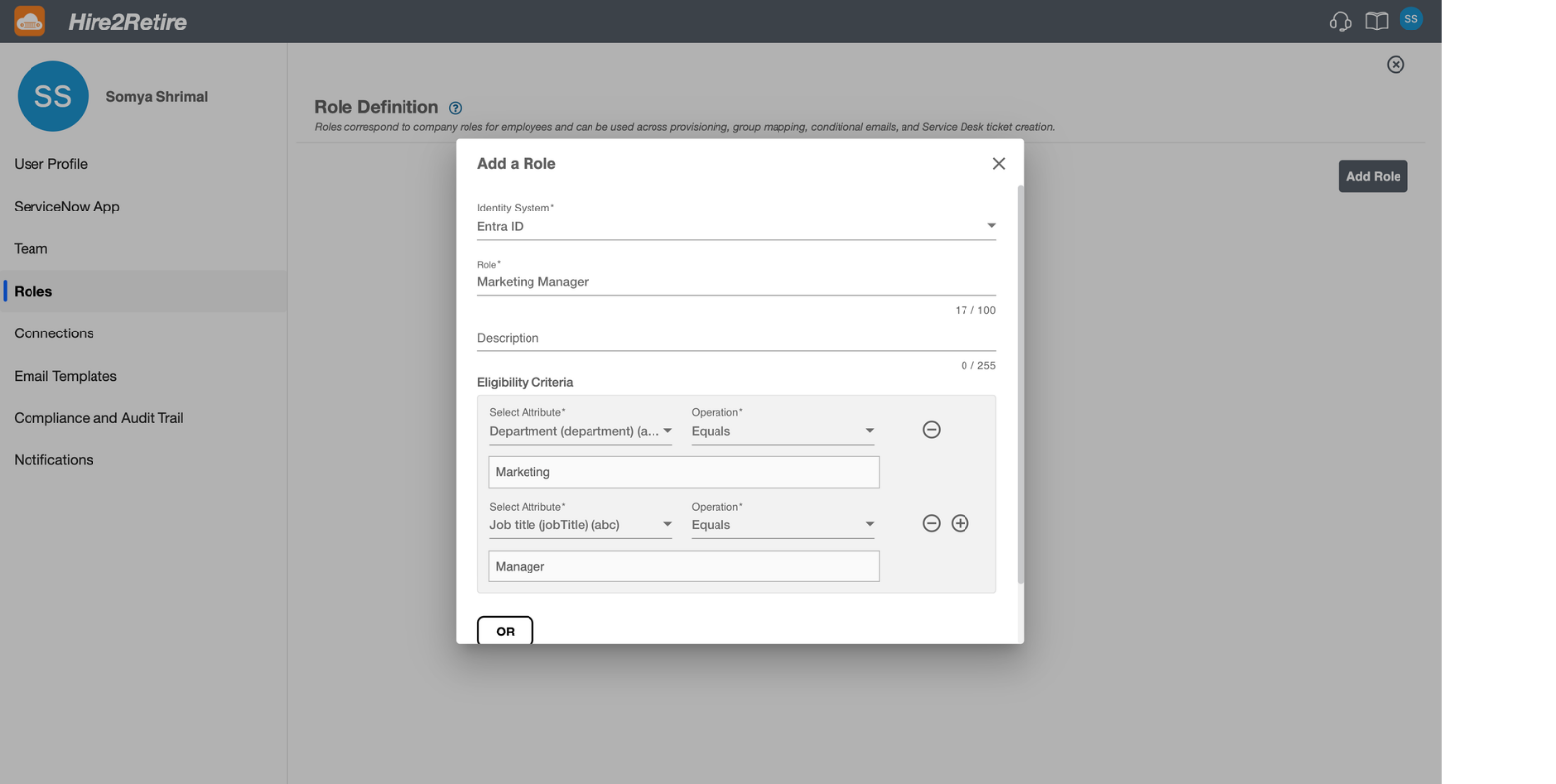
For example, a role like Sales Manager need to be defined once where title equals Manager and Department equals Sales. A role like Product Manager US role adds a location condition.
Where Role-Based Mapping Applies
Roles are available as conditions across the core configuration areas in Hire2Retire:
SCIM Provisioning and License Assignment
On the Hire2Retire’s Access page, users can define provisioning criteria using role, attributes, or privileges, or a combination of all three. License attributes such as profile, application roles, and permission sets are mapped individually, each with its own role-based criteria. The first matching criteria row is applied, giving admins precise control over precedence.
Group Assignments
Roles can be used to assign AD (Active Directory) security groups combining roles with other attributes like location. A Marketing Manager gets assigned to the Marketing and Manager security groups automatically. A Marketing Manager in USA gets an additional location-specific group with no separate attribute logic requirement.
ITSM Ticket Creation
Service desk workflows in Hire2Retire use roles to determine set of IT actions at JML events. Marketing Intern and Sales Intern trigger one equipment kit ticket, Product Intern triggers another. Users can define each condition as per role without rebuilding set of title and department attributes, keeping service desk configurations through ITSM integration readable and easy to update.
Communication Hub
Hire2Retire also lets users define conditional email workflows through role conditions. A Product Manager onboarding email automatically goes to every new hire whose department is Product and title is Manager. It is very useful when IT Admin wants to send different email based on roles.
How to Set It Up
To define roles in Hire2Retire, users need to:
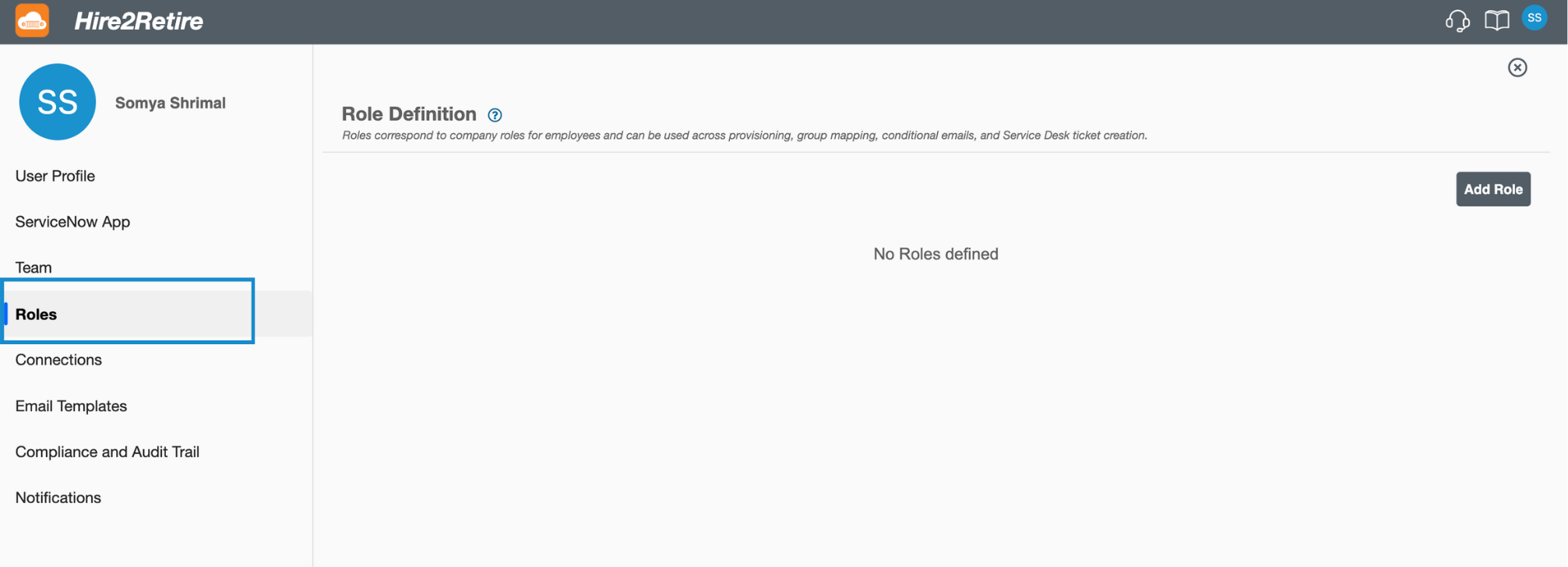
Navigate to Account Settings page and choose Role tab from left panel. On the Role Definition page, click on Add role.
Select your Identity Provider either Entra ID or Hybrid or On-prem AD and enter Role name. Define Eligibility Criteria from Attribute conditions and Operations. Users can use AND/OR logic here to define multiple conditions for a single role.
Save the defined role and now you are good to use these company roles across provisioning, group mapping, conditional emails, and Service Desk ticket creation.
Why This Matters for IAM teams
Attribute sprawl creates maintenance problems. By centralizing access logic at the role level, Hire2Retire provides IT teams a single place to define how a job function maps to access and ensure that every downstream configuration reflects that definition accurately.
Role based configuration simplifies mapping for organizations who already have defined roles. They just need to define a particular role once and every downstream configuration picks it up at the next deployment.
As your organization grows, adds applications, restructures departments, or expands to other locations, the role library scales with it. Where new roles take minutes to define, existing roles take one update to modify. Every workflow such as provisioning, group assignment, ITSM, or communication email inherits those changes automatically.
If you have questions about where roles can be used or how to define criteria, reach out to Hire2Retire support team.
If your team is still managing access through manual attribute configurations or juggling spreadsheets, tickets, and disconnected HR and IT systems, there is a better way.