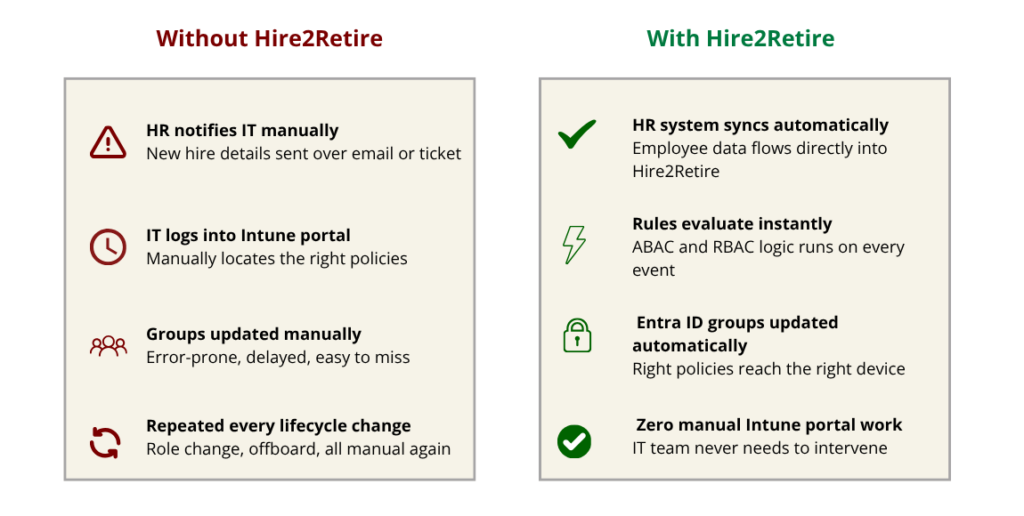
Device Policy Management is one of those IT tasks that feels like it should be automatic but never quite is. An HR approves a new hire, send over the details to IT, and somewhere between that ticket and employee’s first day, someone has login into Intune. They have to find the right policies, track correct Entra ID security groups, and manually provide access to new hire, leading to delays and often human errors. This process is repeated when that employee changes role and then again at their last day.
Intune Policy Enforcement process was traditionally designed around static environments where headcounts were predictable, roles were stable and there were long change cycles. However, with the modern organizations, workforces are dynamic. Employee attrition rate is high. Every time an employee’s status changes without a corresponding update in policies, it leads to risks such as non-compliant devices, over-provisioned access, and security and compliance risks.
The reason behind this gap is disconnected HR and IT systems. Where employee role and location information reside in HR, policies and devices information is in Intune. With Hire2Retire’s latest Phase 10.5 Release, this scenario changes completely.
What is Microsoft Intune?
Microsoft Intune is a cloud-based endpoint management solution that helps organizations control how devices and applications are used across their workforce. It enforces usage and security policies across iOS, Android and Windows. Microsoft Intune covers everything from passcode requirements to encryption standards.
Microsoft Intune has two core management modes.
Mobile Device Management (MDM)– It includes control over enrolled devices and manages settings, security, and apps.
Mobile Application Management (MAM)- It protects individual applications and specific data inside them. It is suitable for Bring your own devices environment where employees use personal devices for work.
For both modes, policies are applied through Entra ID security groups. When a group is assigned to a policy, automatically every member of the group receives it automatically.
Intune Policy Management with Hire2Retire
With phase 10.5 release, Hire2Retire now integrates directly with Intune, letting you view and assign device and application policies directly from the platform.
This integration is supported for Entra ID and Hybrid AD environments with Entra ID Security Groups and Exchange Online features enabled.
The new Intune Policy Management section in Hire2Retire supports two assignment methods:
Attribute-based policy enforcement
In this method, users can define conditions using HR attributes like department, location, job title. Hire2Retire add users to assigned groups and attach such groups to the selected Intune policy as per defined conditions. A Finance Analyst in New York receives your Finance compliance policy and mobile app protection profile the moment their record sync. A manager gets layered policies from multiple rules simultaneously without any IT tickets.
Group based policy enforcement
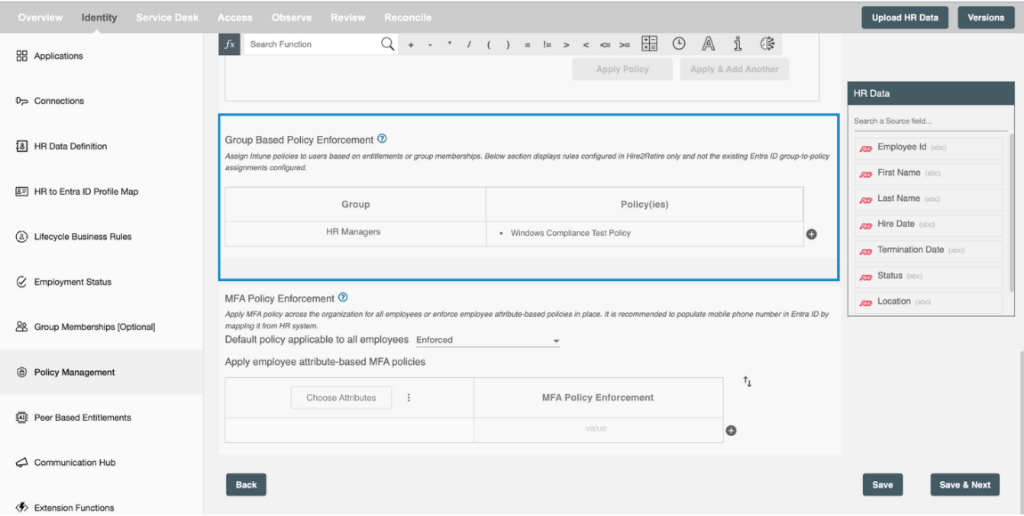
In this method, users can define conditions to assign Intune policies to users based on entitlements or groups. If an employee belongs to a specific Entra ID group, Hire2Retire maps that group to the corresponding Intune policies and ensures the assignment exists. This is useful when your existing entitlement structure already reflects role or access tiers, and you want policy enforcement to follow the same logic without rebuilding your setup.
Users can define policy enforcement through both methods within Hire2Retire without opening Intune portal to manage assignments.
How Hire2Retire Helps
Hire2Retire helps in Policy Management throughout the JML lifecycle. As soon as a new hire record is created in Entra ID, Hire2Retire evaluates their attributes, placing them in the relevant Entra ID group and their devices start receiving MAM or MDM policies without any manual setup. This feature will also be helpful for bulk onboarding where you can define rules once and assign right policies to hundreds of employees with zero manual assignments.
When an employee changes role or department, their policy requirements change. Hire2Retire ensures that their policies are always current by detecting changes in attributes and updating policies automatically without anyone having to remember to do it.
How to Set It Up
From the left navigation panel of Hire2Retire, you can find Policy Management section. From there, users can view all Intune policies defined in your tenant.
To create an attribute-based rule, click Add rule and define your attribute conditions using AND/OR logic, then map each policy to the Entra ID security group that carries it. Once saved, the rule runs automatically during every lifecycle event.
For group-based assignments, use the mapping table to pair Entra ID groups with the policies that should apply to their members. Hire2Retire checks these assignments at runtime and add any missing group to policy links automatically.
Automated Endpoint Policy Management for a Zero Trust Foundation
Zero Trust ensures no user or device should be trusted by default and access and compliance policies should be continuously enforced based on verified identity and attributes. When policies are handled manually, there will always be gaps. Hence for Zero Trust security posture, automated endpoint policy management is crucial.
Hire2Retire ensures policy enforcement becomes a function of your HR data and not a downstream IT task that depends on someone remembering to act on it. Every JML event trigger the right device compliance and application policies automatically, keeping your endpoint management alignment with your identity lifecycle in real time.