
140+ Employees
Compliance is a very important issue when it comes to businesses in healthcare and life sciences because of the high accuracy required for such operations. Still, there are companies that manage access manually by having HR teams add or delete users from their employee record books and IT professionals provisioning or revoking access through identity systems.
In this case study, we will explore how the company Surgical Solutions managed to automate ADP and Entra ID sync with the Hire2Retire by RoboMQ.
Surgical Solutions operates in the healthcare industry. With a workforce of over 140 people, Surgical Solutions helps healthcare organizations increase efficiency in their surgical and sterile processing departments.
The business uses ADP for HR management tasks such as keeping employees’ records, recruiting, and training new workers and Azure Active Directory (Entra ID) to control access to systems.
With the growing business size, coordinating employee recruitment and management across different platforms was increasingly challenging. Surgical Solutions required an approach that would integrate ADP with Entra ID and automate the entire process of managing the employees’ lifecycle.
Before implementing Hire2Retire, the onboarding process was manual and depended on humans. As the organization grew, this manual process became a big obstacle to its operations since it led to inefficiencies, delays, and inconsistencies. Moreover, it increased the workload for both the Human Resources (HR) and Information Technology (IT) teams.
Employees had their accounts created manually by both HR and IT, which required significant time and coordination from both teams for each new employee. Given that there are currently more than 140 employees in Surgical Solutions and the number is likely to grow, this process became unsustainable and time-consuming.
ADP and Entra ID were completely separated systems that did not exchange any data automatically. Therefore, when HR added a new employee to ADP, there was no automatic transfer of that information from ADP to Entra ID. There were multiple steps in onboarding where HR had to act, and each step took time before IT could complete the required actions.
The organization has not created a systematic way to define which roles, departments, locations, and other custom attributes provide access rights across all applications or systems. Without an RBAC framework in place, it was not possible to automate provisioning tools, SharePoint sites, shared mailboxes, and other resources as new employees join the organization based upon their job function and organizational placement.
The organization had not developed its role-based access control practices properly to map out roles, departments, locations, and custom fields to user permissions. Without this RBAC model, it is impossible to provide users with appropriate access levels to SharePoint sites, shared mailboxes, Office 365 licenses, and other resources depending on their role and department.
There was some documentation available for previous onboarding projects; however, it had not been evaluated and updated to meet the organization’s current requirements and needs. As a result, there were no standardized onboarding processes that could be used to create scalable workflows in Azure AD and Intune.
The API credentials for Surgical Solutions with ADP were already available – a process that normally took several weeks due to correspondence between the two companies. However, had not been used for configuration yet. The project itself was not established within the ADP developer portal, nor were there any permissions configured for the necessary endpoints.
Surgical Solutions had API credentials for accessing the ADP API, which is usually a process that can take several weeks of constant communication back and forth with ADP. However, they had not yet configured those credentials or set up the API project in the ADP developer portal. Therefore, there were no permissions set up for the required endpoints, causing a critical integration route to be dormant and delaying the project.
RoboMQ’s Hire2Retire proved to be a comprehensive solution that meets Surgical Solutions’ complete HR-to-IT automation requirements, enabling them automate their employee lifecycle management from pre-hire to termination.
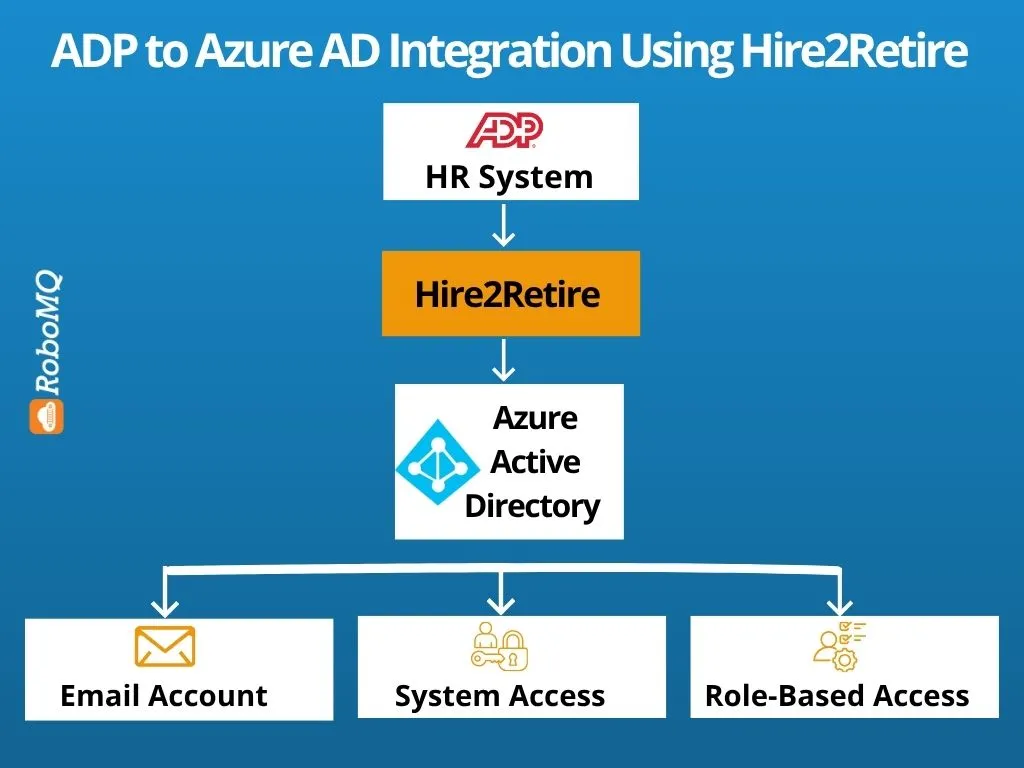
The Hire2Retire solution established an automated real-time integration of ADP and Azure Active Directory. This allowed all employee information entered in ADP, such as job title, department name, manager assignment, etc., to flow directly into Azure AD to facilitate the automated creation and management of user identities without any need for manual involvement from IT.
Once the signed offer letter is recorded in ADP, typically two weeks before the employee starts, Hire2Retire automatically generates the Azure AD account for the new hire. Other parameters are added during the process as they are received in ADP, ensuring the accuracy of information at any point in time.
RoboMQ helped sync Associate IDs from ADP to Azure AD by offering a PowerShell code that would extract these IDs from ADP once, match them to work email addresses in Azure AD, and populate the Associate IDs permanently as an attribute. Starting from go-live onwards, Hire2Retire automatically fills out Associate IDs for all new employees going forward.
A specific application was registered in the Azure AD directory belonging to Surgical Solutions, where Hire2Retire assigned to the application only the minimum permissions required, including the ability to manage shared mailboxes and terminate user accounts.
Hire2Retiree helped Surgical Solutions’ HR and Digital Operations teams to implement role-based access control, assigning access rights based on employees’ job titles, departments, and locations.
Onboarding is just one part of what Hire2Retire did for Surgical Solutions. Hire2Retire also handled workflows related to various milestones of the employee lifecycle, such as transfer, leave of absence, and termination, all custom-made for Surgical Solutions’ unique needs.
After implementing Hire2Retire, Surgical Solutions improved several HR and IT processes.
The manual onboarding process managed by HR and Digital Operations teams was automated. This meant new hires’ accounts, access, and IT infrastructure were set up automatically. This ensured that both HR and Digital Operations teams could focus on other tasks.
Data transfer between ADP and Azure AD became automatic and smooth since they worked in harmony and did not work in silos. This ensured consistency and accuracy in the management of data throughout the employee lifecycle.
Accounts for new hires were set up automatically, even before they came to work. All thanks to automation, which ensured employees had everything in place before starting their jobs, and they got a much better first-day experience.
Having RBAC in place through automation meant that Surgical Solutions could onboard any number of employees without proportional effort from their HR and IT teams. Regardless of growth in organization size, the Hire2Retire implementation kept pace with growing employee numbers by onboarding and offboarding as necessary.
Having access to API credentials from ADP in advance saved weeks on each implementation, which was usually added as part of the timeline for other implementations. Surgical Solutions had a six-week timeline in place that was successfully kept within that period and even enabled them to implement early.
The white glove implementation provided members of the Surgical Solutions team with an understanding of how the workflows for Hire2Retire were put into place. With that kind of understanding, the HR and IT teams could manage and extend the system on their own whenever needed.
With the help of Hire2Retire, Surgical Solutions managed to automate all their processes related to onboarding new employees and provisioning them with necessary credentials. The collaboration between ADP and Azure Active Directory helped get rid of the need for any manual operations and provide timely access to systems that new employees required.
The introduction of automated employee lifecycle management helped Surgical Solutions achieve better scalability, security, and efficiency in their access and identity management as well. Want to automate onboarding and identity management for employees in your organization?
Schedule a consultation call and find out how Hire2Retire can help automate your HR and IT processes.
If you have any question about Hire2Retire, Schedule a demo call with us to see what Hire2Retire can do to improve your Identity management.
140+ Employees